

Bubble pricing plans explained: real costs in Sept 2026
18 min
read
Bubble pricing starts at $29/month but your real bill depends on workload units, plugins, and per-app structure. Here is every cost broken down clearly.


Quick Comparison of Bubble Pricing Plans
| Plan | Best For | Monthly Cost (Web + Mobile) | Editors | Workload (WUs) | Key Limits to Watch |
|---|---|---|---|---|---|
| Free | Learning, testing ideas | $0 | 1 | Very limited | No custom domain, not for live apps |
| Starter | Early MVPs, small live apps | $59 | 1 | ~175K | Hits WU limits fast with real users |
| Growth | SaaS, marketplaces, real users | $209 | 2 | ~250K | Limited team size, WUs still matter |
| Team | Scaling products, larger teams | $549 | 5 | ~500K | Cost rises with heavy usage |
| Enterprise | Mission-critical, regulated apps | Custom | Custom | Custom | Longer setup, higher commitment |
| Plan | Best For | Monthly Cost (Web + Mobile) | Editors | Workload (WUs) | Key Limits to Watch |
|---|---|---|---|---|---|
| Free | Learning, testing ideas | $0 | 1 | Very limited | No custom domain, not for live apps |
| Starter | Early MVPs, small live apps | $59 | 1 | ~175K | Hits WU limits fast with real users |
| Growth | SaaS, marketplaces, real users | $209 | 2 | ~250K | Limited team size, WUs still matter |
| Team | Scaling products, larger teams | $549 | 5 | ~500K | Cost rises with heavy usage |
| Enterprise | Mission-critical, regulated apps | Custom | Custom | Custom | Longer setup, higher commitment |
How Bubble Pricing Works (Read This First)
Before looking at Bubble pricing plans, you need the right mental model. Bubble pricing is based on how your app runs and scales, not just on features.
Many teams choose the wrong bubble pricing plan because they treat pricing like a simple subscription, then hit limits later. Understanding how Bubble charges helps you avoid forced upgrades and performance issues.
- Bubble charges per app, not per account
Each Bubble app has its own plan. If you run multiple apps, each one needs its own subscription. Editors and collaborators are tied to the app plan, not your personal account. - Web-first pricing, mobile as an extension
Bubble pricing is designed around web applications. Mobile usage through wrappers or native editors still relies on the same backend, workflows, and workload limits, which affects plan choice. - Pricing is tied to usage, not just features
Plans differ by workload capacity, performance limits, collaboration needs, and production readiness. Choosing a plan without understanding how your app will be used often leads to early bottlenecks.
Bubble pricing makes sense when you see it as infrastructure, not just software access. Once you understand how your app consumes resources, picking the right plan becomes much easier.
Read more | Bubble.io Capabilities and Limitations
Types of Bubble Pricing Plans in 2026
Bubble offers multiple pricing plans designed around how your app is built, launched, and scaled. Each plan unlocks different levels of performance, capacity, and production readiness.
The right choice depends on whether you are experimenting, launching, or supporting real users.
1. Free Bubble Plan
The Free Bubble plan is meant for learning and early experimentation, not for running a real product. It gives access to the core building experience but restricts anything related to production use or scaling.
- Features included in the Free plan
You get access to the Bubble editor, visual design tools, database creation, and workflow logic. This allows you to build full prototypes and understand how Bubble works end to end. - Key limitations of the Free plan
Apps stay on a Bubble subdomain, cannot use custom domains, and are not suitable for real users. Capacity, performance, and advanced security features are limited, making production use impractical. - What you realistically get from the Free plan
The Free plan is ideal for learning Bubble, testing ideas, and validating basic app logic. It helps you decide whether Bubble fits your product before upgrading, but it should not be used to launch or scale an app.
The Free Bubble plan works best as a testing ground. Any serious web app, MVP, or business system will need a paid plan to run reliably and grow.
Read more | Bubble Pros and Cons
2. Bubble Starter Plan
The Bubble Starter plan is designed for projects that are ready to launch but do not yet need high scale or large teams. It unlocks production features while keeping costs relatively low, making it suitable for early MVPs and small live apps.
- Pricing for the Starter plan
The Starter plan costs $59 per month for web and mobile combined when billed annually. If you only need web, the plan costs $29 per month. If you only need mobile, the plan costs $42 per month. Pricing depends on how you plan to ship your app. - Key features included
The Starter plan includes recurring workflows, basic version control, and 175K workload units per month. You can launch a live web app with a custom domain and submit mobile builds, making it the first plan suitable for real users. - Main limitations to consider
Workload capacity is limited and can be reached quickly if users grow or workflows are heavy. Collaboration is basic, server logs are short, and advanced security or scaling features are not included. - Who the Starter plan is best for
This plan works well for early-stage MVPs, small internal tools, and low-traffic web apps. It is often a stepping stone before upgrading to Growth as usage increases.
The Starter plan is ideal for launching, but not for scaling. Most serious products eventually need more capacity and control as real users arrive.
Read more | Can I Build a Mobile App with Bubble?
3. Bubble Growth Plan
The Bubble Growth plan is built for apps that have real users and active teams. It adds better collaboration, security, and higher capacity, making it the most commonly used plan for growing products and SaaS apps.
- Pricing for the Growth plan
The Growth plan costs $209 per month for web and mobile combined when billed annually. If you only need web, the price is $119 per month. If you only need mobile, the plan costs $169 per month. - Key features included
Growth includes everything in Starter, plus premium version control, two-factor authentication, support for two app editors, ten custom branches, and 250K workload units per month. Server logs are also extended to 14 days. - Main limitations to consider
While capacity is higher, fast-growing apps can still hit workload limits. Team size and branching are limited compared to higher plans, and enterprise-level controls are not included. - Who the Growth plan is best for
This plan works well for SaaS products, marketplaces, and internal tools with active users. It is often the long-term plan for teams that need stability without enterprise-level complexity.
The Growth plan balances cost and capability. It is a strong choice once your app moves beyond a simple launch and starts to grow steadily.
Read more | How to choose a Bubble agency
4. Bubble Team Plan
The Bubble Team plan is designed for scaling products with growing teams and higher usage demands. It adds stronger collaboration tools, higher capacity, and better control, making it suitable for mature apps that support daily operations or revenue-generating users.
- Pricing for the Team plan
The Team plan costs $549 per month for web and mobile combined when billed annually. If you only need web, the plan costs $349 per month. If you only need mobile, the price is $449 per month. - Key features included
Team includes everything in Growth, plus support for sub-apps, five app editors, twenty-five custom branches, and 500K workload units per month. Server logs are extended to twenty days, improving debugging and monitoring. - Main limitations to consider
While capacity is much higher, very large apps or enterprise systems may still outgrow workload limits. Advanced compliance, dedicated infrastructure, and custom SLAs are not included. - Who the Team plan is best for
This plan fits scaling SaaS products, data-heavy internal systems, and teams that need multiple editors and structured collaboration.
The Team plan supports serious growth. It is often chosen when Bubble becomes a core part of business operations rather than just a product experiment.
Read more | How to hire Bubble developers
5. Bubble Enterprise Plan
The Bubble Enterprise plan is built for organizations that need maximum security, control, and scalability. It is designed for mission-critical applications, regulated environments, and large teams that require custom infrastructure and dedicated support.
- Pricing for the Enterprise plan
Bubble does not publish fixed pricing for the Enterprise plan. Costs are custom and based on workload needs, infrastructure requirements, and support levels. Pricing is discussed directly with the Bubble sales team. - Key features included
Enterprise includes everything in the Team plan, plus custom workload units, choice of hosting location, customizable server setup, and a dedicated support team. Billing by invoice or ACH is also supported. - Main limitations to consider
The Enterprise plan requires direct coordination with Bubble and longer onboarding. It is not cost-effective for early-stage products or small teams that do not need advanced compliance or infrastructure control. - Who the Enterprise plan is best for
This plan fits enterprises, regulated businesses, and high-scale platforms that need strict security, custom performance tuning, and guaranteed support.
The Enterprise plan removes most platform limits. It is best chosen when Bubble is a core system and uptime, security, and control are business-critical.
Read more | How we build an AI-powered app with Bubble
What You Get in Each Bubble Pricing Plan
Bubble pricing plans unlock features gradually as your app moves from testing to real-world use and then to scale. Understanding what each plan includes helps you choose based on operational needs, not just price. Below is a clear breakdown of what actually changes as you move up plans.
- Live app access and custom domains
Only paid plans allow you to run a live app. Starter and above let you connect a custom domain, while the Free plan keeps apps on a Bubble subdomain and is not suitable for production. - Number of editors and collaboration
The Free and Starter plans are limited to a single editor. Growth supports two editors, Team allows five, and Enterprise supports custom team sizes. This matters once multiple people work on the app. - Branding removal
Bubble branding is removed once you move beyond the Free plan. Paid plans allow a fully white-labeled experience, which is important for customer-facing products. - Server log retention and debugging
Server log access increases with each plan. Starter includes two days of logs, Growth provides fourteen days, Team extends this to twenty days, and Enterprise offers custom retention. Longer logs help debug production issues. - Security and compliance features
Advanced security features like two-factor authentication and better access controls are available from the Growth plan onward. Enterprise adds hosting location control and custom security setups for regulated environments. - Collaboration and version control
Version control and branching improve as you move up plans. Growth adds premium version control, Team increases branch limits, and Enterprise supports custom workflows for large teams.
Each Bubble pricing plan is designed for a different stage. The right choice depends on how live your app is, how many people work on it, and how critical stability and security are to your business.
Read more | Bubble MVP app development
Understanding Workload Units (WUs) in Bubble
Workload Units are the real engine behind Bubble pricing. They decide how much traffic, automation, and complexity your app can handle each month. Many teams worry about plan prices, but WUs are what actually control cost and scalability as usage grows.
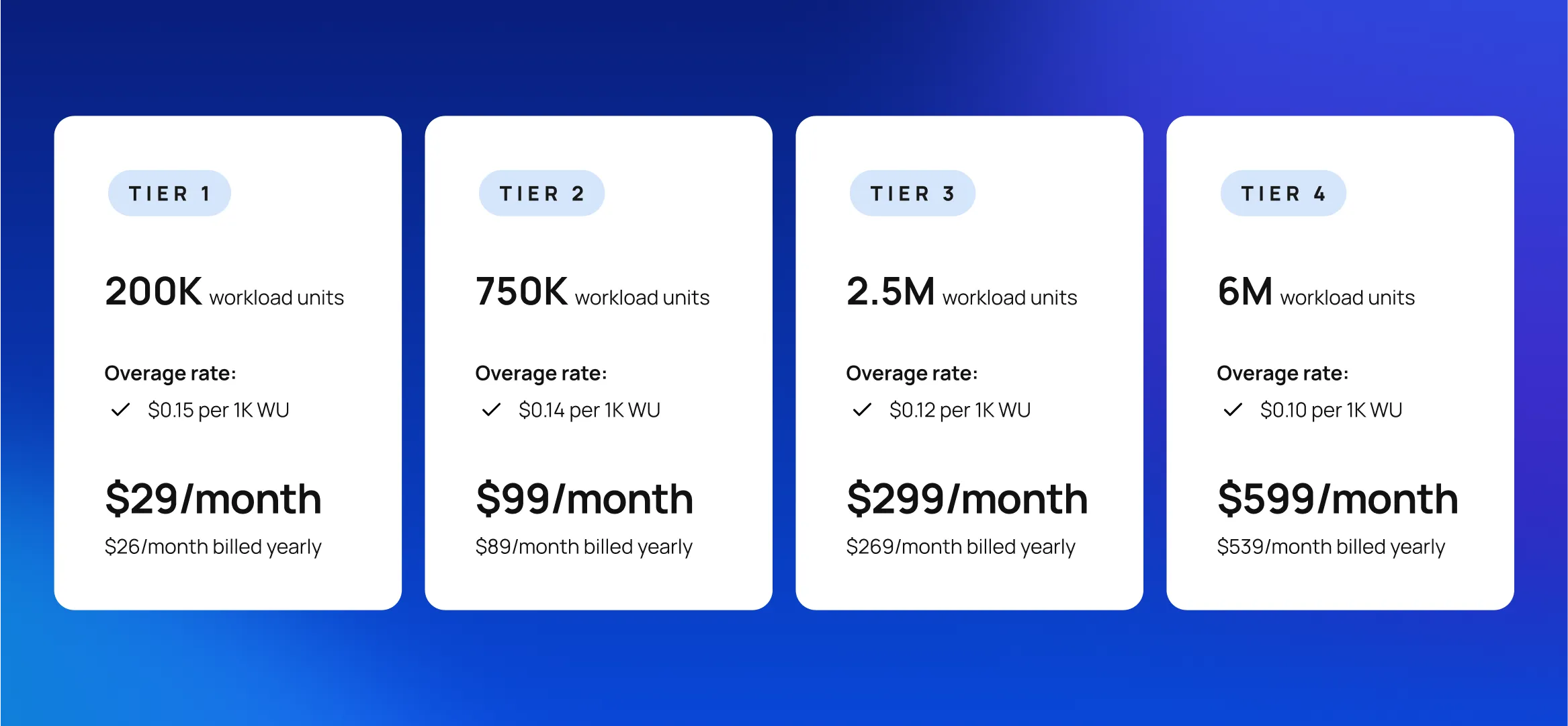
- What Workload Units are
Workload Units measure the processing effort used by your Bubble app. Every page load, workflow, database search, API call, and background task consumes WUs based on how heavy the operation is. - How Workload Units are consumed
WUs are used whenever users interact with your app or when backend workflows run automatically. The more users, data, and automation you have, the faster WUs are consumed. - Why WUs matter more than plan price
Two apps on the same plan can have very different costs. A poorly optimized app can burn through WUs quickly, while a well-designed app can support many more users on the same plan. - Common features that consume high WUs
Large database searches, repeating workflows, heavy API usage, file processing, complex conditions, and frequent background jobs are the biggest WU consumers.
Example of a bubble workload units
Imagine a marketplace app where each page load runs several database searches, loads long lists, and triggers backend workflows for analytics.
Even with moderate traffic, this can quickly consume the bundled WUs. In this case, upgrading to a workload tier like 750K or 2.5M WUs may be cheaper than upgrading the entire app plan.
Understanding WUs helps you plan smarter. Optimized workflows and clean data design reduce costs and delay expensive upgrades as your app grows.
Read more | Best Backends for Bubble
Real Cost of Using Bubble (Plan + Usage)
Bubble pricing goes beyond the plan headline. The real cost depends on how your app is built, how many users it serves, and how much automation runs behind the scenes. Looking at realistic ranges helps you budget properly and avoid surprises later.
- Base plan cost vs actual monthly cost
While plans start at $59, $209, or $549 per month, many live apps spend between $200 and $1,000 per month once usage, add-ons, and growth factors are included. The gap widens as user activity increases. - How add-ons affect pricing
Add-ons like extra workload tiers or collaboration features can add $29 to $599 per month. Teams often add these instead of upgrading the full plan when usage grows unevenly. - Storage limits and extra storage costs
Apps that handle images, files, or documents often exceed included storage. Extra storage typically adds $10 to $100+ per month depending on file volume and growth rate. - Plugin and third-party service costs
Paid Bubble plugins usually range from $5 to $50 per month per plugin. Third-party tools like email, analytics, AI APIs, or automation tools can add another $50 to $300+ per month depending on usage and users. - Workload overages and extra WU packs
Growing apps often add workload tiers instead of upgrading plans. Extra WU packs range from $29 per month for 200K WUs to $299 or $599 per month for higher tiers. Apps with hundreds or thousands of users commonly fall in this range.
The real monthly cost of Bubble often lands between $300 and $1,500 per month for active business apps, depending on scale, usage patterns, and optimization quality.
Read more | Bubble App Examples
Actual Cost of Building a Bubble App (Platform + Build)
Beyond platform costs, building the app itself is the largest investment. This depends on who builds it and how complex the product is.
- Agency-built Bubble apps
Most Bubble agencies charge $100 to $200 per hour. Fixed-price projects typically range from $10,000 to $40,000 for MVPs and production-ready apps. Bubble agencies include planning, UX, QA, and scalability, which reduces long-term risk. - Freelancer-built Bubble apps
Bubble freelancers often charge $40 to $100 per hour. While cheaper upfront, this model carries higher risk for complex products due to limited capacity, weaker documentation, and dependency on one person. - DIY Bubble development
DIY reduces build cost but increases long-term risk. Poor data structure, inefficient workflows, and missed scalability planning often lead to performance issues and expensive rebuilds later. Many teams eventually pay more fixing DIY builds than building correctly from the start.
The true cost of Bubble is a combination of platform pricing, usage growth, and build quality. Investing in clean architecture early usually keeps both monthly costs and rebuild risk much lower over time.
Read more | Types of apps you can build with Bubble.io
Bubble Pricing for Common Use Cases
Bubble pricing makes more sense when you map it to real use cases. Different products consume very different resources, even if they look similar at first. Below is a realistic view of how Bubble costs usually break down by app type and how they change as usage grows.
- Prototypes and early MVPs
Most prototypes and early MVPs run on the Starter or Growth plan. Monthly platform costs usually range from $59 to $209. With light usage and minimal automation, total monthly cost often stays under $200. This stage focuses on validation, not scale. - SaaS products
SaaS apps usually need the Growth or Team plan due to recurring workflows, user accounts, and integrations. Monthly platform costs often fall between $209 and $549, plus $99 to $299 for extra workload tiers as users grow. Mature SaaS products commonly spend $400 to $1,200 per month on Bubble. - Marketplaces
Marketplaces consume more WUs because of search-heavy pages, listings, messaging, and transactions. Most start on Growth but move to Team quickly. Monthly costs often range from $300 to $1,500, depending on traffic, listings, and automation complexity. - Internal business tools
Internal tools usually have fewer users but heavy workflows. Starter or Growth plans often work initially, with monthly costs around $100 to $400. Costs increase mainly with automation volume, not user count. - How costs change as users and data grow
As users increase, costs rise through workload usage, storage, and integrations rather than plan upgrades alone. Well-optimized apps scale gradually, while poorly designed apps see sharp cost jumps early.
Bubble pricing scales with usage, not just ambition. Matching your plan to your use case and building efficiently keeps costs predictable as your product grows.
Read more | Bubble vs FlutterFlow for AI App Development
When You Need to Upgrade Your Bubble Plan
Upgrading a Bubble plan is usually driven by usage and operational needs, not by time. Many teams wait too long and experience slow performance or blocked workflows, while others upgrade too early and overpay. Knowing the right signals helps you upgrade at the right moment.
- Signs you’ve outgrown the Free or Starter plan
If your app has real users, needs a custom domain, or runs recurring workflows, the Free plan is no longer suitable. Starter becomes limiting when workload usage spikes or basic collaboration is not enough. - Performance and workload thresholds
Frequent slow page loads, delayed workflows, or hitting workload unit limits are clear signals. When WU usage approaches monthly limits consistently, it is time to upgrade or add workload capacity. - Team collaboration requirements
Once multiple people need to work in the app, Growth or Team plans become necessary. Limited editors and version control slow development and increase risk. - Security and scaling triggers
Features like two-factor authentication, longer server logs, and better access control are required as apps grow. Regulated use cases or high-traffic apps often need higher plans sooner.
Upgrading should be a strategic move, not a reaction to failures. Monitoring usage and planning ahead keeps your app stable as it grows.
Read more | Bubble vs FlutterFlow
Hidden Bubble Costs and Pricing Pitfalls to Watch Out For
Bubble pricing is transparent, but real costs can still surprise teams if they are not planned for. Most pricing issues come from usage growth, design decisions, or overlooked limits rather than sudden price changes. Knowing these pitfalls early helps you stay in control as your app scales.
- Unexpected workload spikes
Usage can jump quickly due to user growth, background workflows, or inefficient searches. Apps without optimized workflows often burn through workload units faster than expected, forcing upgrades earlier than planned. - Storage overages
File-heavy apps that handle images, documents, or media can exceed included storage. Without limits or cleanup rules, storage costs quietly increase month over month. - Plugin subscription creep
Paid plugins seem inexpensive individually, but multiple plugins at $10 to $50 per month each add up. Over time, plugin costs can rival the base plan price. - Editor seat limitations
Lower plans restrict the number of editors. As teams grow, adding collaborators may require plan upgrades even if workload usage is still manageable. - Mobile pricing considerations
Mobile-only or web-only pricing looks cheaper, but many apps eventually need both. Switching later can increase costs, especially when mobile builds and backend usage grow together.
Most hidden costs come from growth and design choices, not Bubble itself. Apps built with clean architecture and realistic scaling plans stay predictable and easier to budget over time.
Read more | Bubble vs Outsystems
How to Choose the Right Bubble Pricing Plan
Choosing the right Bubble pricing plan is about aligning cost with how your product actually behaves, not just where you are today. The goal is to stay flexible early, avoid forced upgrades, and scale costs in a controlled way as usage grows.
- Match the plan to your product stage
Use the Free plan only for learning and testing. Starter fits early MVPs with low traffic. Growth works for live SaaS products and marketplaces. Team is better once Bubble becomes business-critical. - Forecast budget beyond the base price
Plan for add-ons like extra workload units, storage, plugins, and integrations. A realistic budget is usually higher than the base plan cost, especially after launch. - Choose between a higher plan or extra WUs carefully
If you hit workload limits but do not need more editors or security features, adding WUs is often cheaper than upgrading the entire plan. - Avoid overpaying or underpaying
Overpaying locks money into unused capacity. Underpaying causes performance issues and rushed upgrades. Monitor usage monthly and adjust gradually.
The right Bubble plan supports growth without stress. Good planning keeps pricing predictable while your app scales.
Read more | Bubble Alternatives
How LOW/CODE Agency Helps Teams Optimize Bubble Costs
Bubble costs are mostly driven by how an app is designed, not just which plan you choose. Many teams overpay because of inefficient workflows, poor data structure, or lack of planning for scale. LOW/CODE Agency focuses on building Bubble apps that stay cost-efficient as usage grows, without cutting corners.
- Cost-efficient Bubble architecture from day one
We design clean data models, scoped searches, and predictable workflows. This reduces unnecessary workload usage and keeps apps stable on lower plans for longer. - Workload optimization strategies
We audit high-WU workflows, move heavy logic to backend workflows, reduce repeated searches, and batch operations where possible. These changes often delay costly plan upgrades. - Pricing planned for scale, not just launch
Instead of optimizing only for MVP launch, we plan how costs will behave at 100, 1,000, and 10,000 users. This helps teams choose plans and add-ons strategically. - Avoiding surprise costs
We flag early risks like plugin overuse, storage growth, and automation spikes. Teams know what will increase costs and when, instead of reacting after limits are hit.
Our goal is simple: help you ship fast without paying a hidden tax later. If you want a Bubble app that scales predictably and stays affordable, let’s discuss your product and see how we can help.
Conclusion
Bubble pricing is predictable when you understand how your app actually uses resources. Plan names matter less than workload usage, automation, storage, and team needs. Teams that plan only for launch often hit limits early, while those that plan for growth stay in control of costs.
Choosing the right Bubble pricing plan means matching it to real usage patterns and scaling gradually. With proper planning, Bubble supports growth without adding friction or surprise expenses.


Related Articles
- How We build an AI-powered app with Bubble
- AI contract management: Making business agreements simple and fast with no-code
- How to build an AI project manager app using no-code
- AppMaster vs FluterFlow
- How to Build a Cross-Platform App with FlutterFlow
- Can You Build SaaS With FlutterFlow in 2026? | Expert Guide
Last updated on
September 28, 2026
.

Jesus is a visionary entrepreneur and tech expert. After nearly a decade working in web development, he founded LOW/CODE Agency to help businesses optimize their operations through custom software solutions.


FAQs
How much does Bubble cost per month?
Does Bubble charge per user or per app?
What are Bubble workload units?
What is the minimum Bubble plan for a live product?
Why is my Bubble bill higher than the plan price?
Is Bubble good for agencies?
Related Articles

Bubble
8 Best Bubble Alternatives to Build Apps in 2026
Explore the 8 best Bubble alternatives in 2026 to build apps faster, compare features, limits, and pricing, and choose the right no-code platform for you.
Comparison
Bubble
Bubble vs Adalo | 11 Factors to Decide the Best One
Compare Bubble vs Adalo across 11 key factors, including app types, backend capabilities, scalability, pricing, limitations, and which platform suits your goals.
.avif)
Bubble
Can I Build Mobile Apps with Bubble (Using the Native Editor)?
Yes, you can build mobile apps in Bubble using the new native editor. Learn its features, limitations, and what’s possible in 2025

Bubble
Are Bubble Apps Secure? (Risks & Best Practices)
Learn how secure Bubble apps really are, the key risks to watch for, and best practices to protect data, users, and production apps at scale.

Why customers trust us for no-code development


