

Bubble Apps Examples: 8 Successful Apps Built With Bubble
21 min
read
Explore Bubble apps examples with 8 successful real apps built with Bubble. See SaaS, marketplaces, MVPs, features, scale, and use cases.


Bubble is a visual app development platform that helps teams build real web and mobile applications without traditional coding. What started as a web-first tool is now used to power full products, with many teams launching SaaS platforms, internal systems, and mobile apps from a single Bubble codebase. This shift has made Bubble a serious option for production apps, not just experiments.
Looking at real Bubble app examples shows what actually works in the real world. These bubble apps handle real users, real data, and real business pressure.
This guide focuses on production-ready Bubble apps across SaaS, marketplaces, internal tools, and mobile experiences, showing how teams move from idea to launch without the overhead of traditional development.
What Can You Build With Bubble?
Bubble is used to build complex, data-driven products that require custom logic, user roles, and scalable workflows. It’s especially suited for platforms that need flexibility, fast iteration, and full control over how the product evolves over time.
- SaaS platforms and subscription-based products
Products with user accounts, subscription plans, feature gating, and billing logic. Commonly used for B2B and B2C SaaS tools that need onboarding flows, account management, and the ability to scale features as the user base grows. - Marketplaces (services, jobs, products, bookings)
Multi-sided platforms connecting buyers and sellers through listings, search, messaging, and transactions. These bubble apps often include approval flows, commissions, booking logic, and role-based access control. - AI-powered tools and assistants
Bubble apps that integrate AI APIs to automate tasks, analyze documents or data, and generate outputs for users. Typical use cases include internal AI tools, assistants, and data-processing products with conversational interfaces. - Internal business tools and admin panels
Custom tools built to manage internal operations, approvals, and workflows. They replace spreadsheets and fragmented systems with centralized bubble apps tailored to how teams actually work. - CRM and customer management systems
Custom CRM solutions designed around specific sales or support processes. They help teams track leads, manage relationships, and centralize customer data without the constraints of off-the-shelf tools. - Dashboards and reporting platforms
Data-driven bubble apps that aggregate information into real-time dashboards. Used for monitoring performance, tracking KPIs, and giving teams visibility into operations and metrics. - Community and social platforms
Platforms focused on user interaction through posts, comments, messaging, and notifications. Often used for private communities, member networks, or social products with controlled access. - Education and learning platforms
Bubble apps that deliver educational content, track progress, and manage courses or training programs. Common in online learning, internal training, and skill development platforms. - Healthcare and wellness web apps
Operational or user-facing bubble apps for data collection, portals, scheduling, and workflow coordination within healthcare, wellness, or related services. - Booking and scheduling systems
Bubble apps that manage availability, reservations, confirmations, and cancellations. Widely used in services, healthcare, events, and professional scheduling contexts. - Finance, operations, and workflow tools
Tools built to handle calculations, approvals, records, and structured operational processes where accuracy, traceability, and automation are critical. - Membership and role-based platforms
Platforms that control access to content and features based on user roles, permissions, or subscription levels, supporting complex access logic within a single product. - Startup MVPs and proof-of-concept apps
Early-stage products designed to validate ideas quickly with real users. Built to iterate fast while maintaining a foundation that can grow into a production-ready platform.
Read more | Types of apps you can build with Bubble.io
Real-World Bubble App Examples
These aren’t demos, templates, or “weekend builds.” Each example below is a production bubble app built for real teams, with real workflows, real users, and measurable results, across categories like internal tools, marketplaces, AI products, and subscription platforms.
1. Career Nerds – Internal business tools and admin panels
A centralized operations platform that replaced a spreadsheet-based coaching workflow with dashboards, role-based access, and automation. It was designed to support a long, structured 6–12 month program without losing visibility or control as the client base grew.
What problem the bubble app solved
CareerNerds relied on Google Sheets with one workbook per client, spread across phases, tabs, and manual updates. Coaches lost time finding the right context, tracking milestones, and coordinating handoffs between branding and networking. There was no scalable accountability system for homework or reminders, and it was getting harder to see the full picture of operations.
Why Bubble was the right choice
The app required multiple user roles (admins, coaches, clients, virtual assistants), plus dashboards tailored to each role and phase of the journey. It also needed custom workflows for progress tracking, collaboration, and a structured LinkedIn feedback loop, without sacrificing speed of iteration during the 14-week build.
Outcomes or measurable results
The new platform reduced time spent on client management through automation and created real operational visibility. Admin effort dropped as progress became visual and actionable, and collaboration improved with cleaner handoffs and centralized context. Results included a 75% reduction in administrative time and a 40% increase in coach productivity within the first month.
2. Career Haven – AI-powered tools and assistants
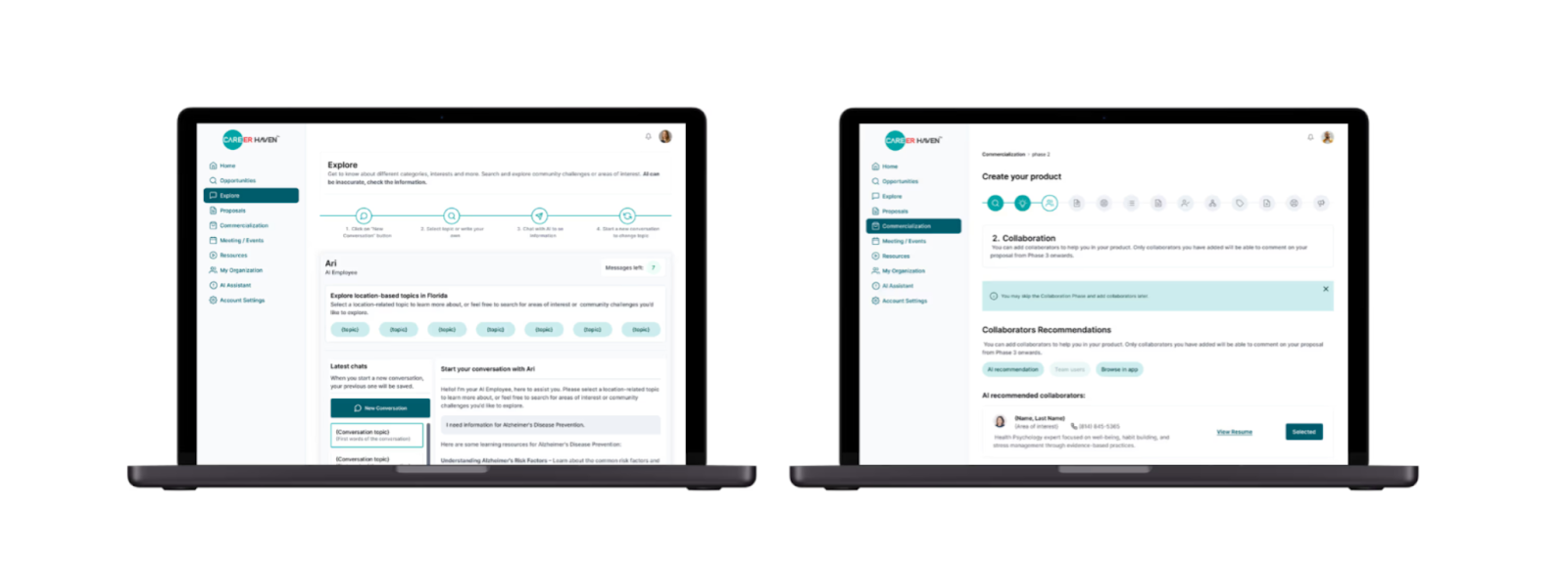
An AI grant proposal platform that evolved from a validated Glide proof-of-concept into a more scalable Bubble product. Built to support a deeper AI-assisted workflow, multi-step journeys, and more robust collaboration as the product matured into its fourth version.
What problem the bubble app solved
The initial version validated demand, but couldn’t support the growing vision: users needed real-time “expert-level” guidance, smoother collaboration, and more scalable architecture as requirements became more complex. The team also needed AI capabilities far beyond what had been built earlier, especially for document-heavy research and proposal requirements.
Why Bubble was the right choice
The Bubble version enabled a more sophisticated product structure for an AI-driven experience. It supported a multi-part user journey, plus integrations that strengthened scalability and data handling (e.g., Bubble as platform + Supabase as database). It also allowed the system to evolve without rebuilding the product from scratch.
Outcomes or measurable results
The platform improved proposal speed and execution by reducing research effort and helping users complete proposals more efficiently. The results include a 40% reduction in time spent on proposal research y 70% of proposals completed within initial timeline estimates, mostrando impacto directo en velocidad y consistencia del output.
3. The Attributes – SaaS platforms and subscription-based products
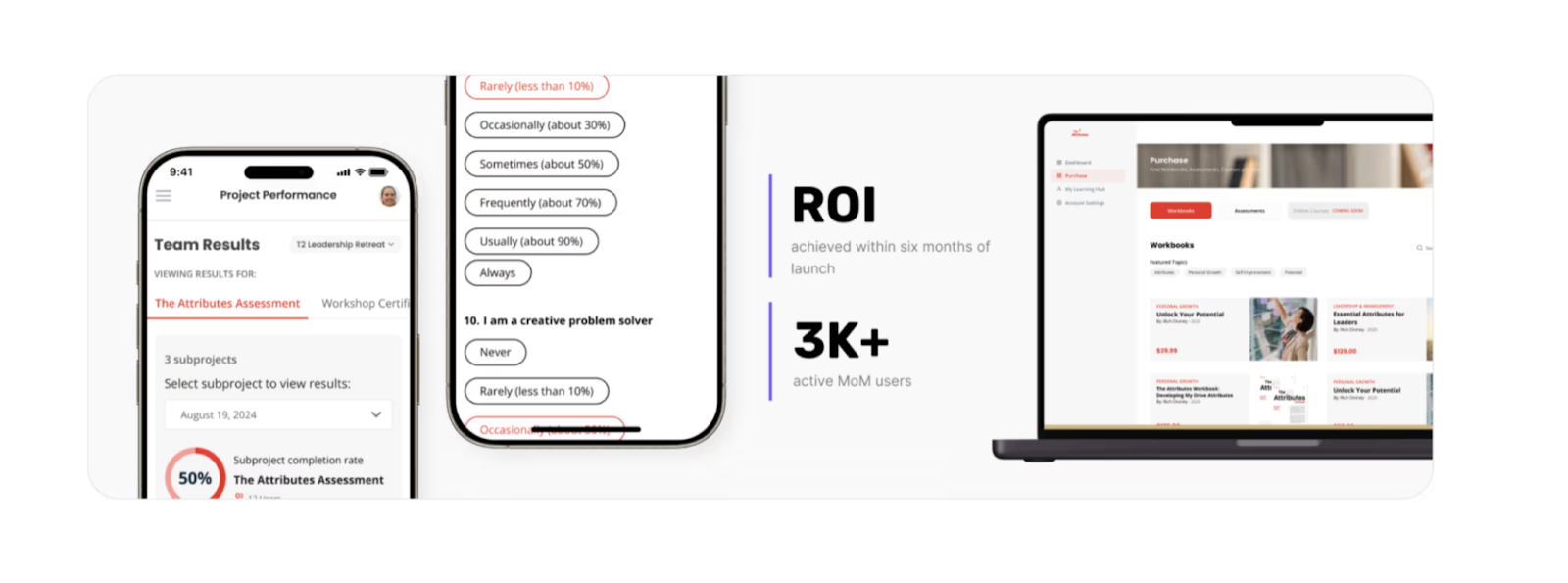
A scalable assessment platform built to support both individual users and enterprise use cases, with multi-role access, professional reporting, and monetization layers. The build evolved in phases, allowing the product to expand without breaking performance as demand increased.
What problem the bubble app solved
Their original Webflow-based tool couldn’t keep up with traction. It struggled with enterprise onboarding, team-based assessments, multi-tier access, and premium outputs expected by high-value clients. The platform limitations effectively capped growth: it wasn’t built for B2B sales, scalable access control, or a broader product catalog.
Why Bubble was the right choice
The system demanded complex role logic (six user types), robust dashboards, advanced reporting, and billing/subscription structures, plus the ability to iterate across versions while maintaining stability. Bubble’s flexibility supported continuous evolution: new modules, scaling to large cohorts, and future AI personalization features layered on top of the core product.
Outcomes or measurable results
The rebuild turned the product into a revenue engine: it achieved ROI within six months of launch, reached 3K+ active MoM users, and successfully onboarded 1,300 users into a single project without performance issues. It also enabled multiple revenue streams through tiered access, digital products, and enterprise subscriptions.
4. BarEssay – Education and learning platforms
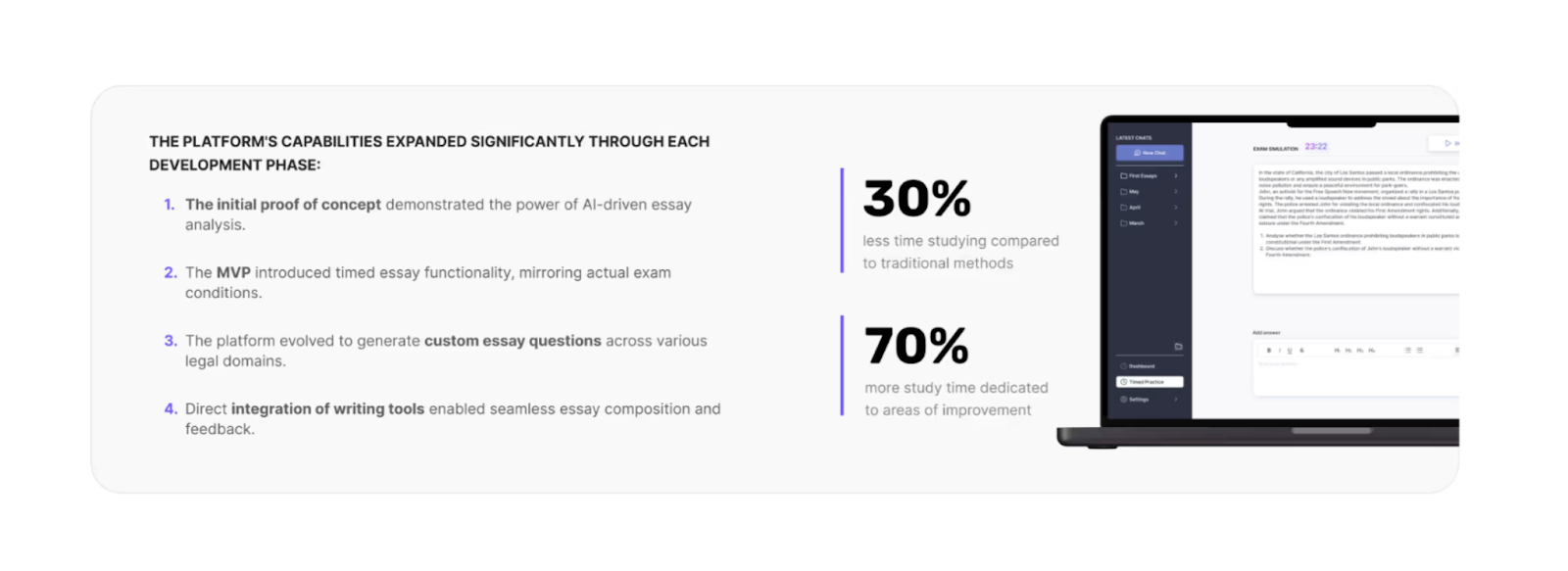
An AI-powered study platform designed to make bar exam preparation more efficient through personalized feedback and targeted practice. Built quickly to ship a functional product experience while preserving a clean, focused interface for intensive study workflows.
What problem the bubble app solved
Traditional bar prep often lacks personalized feedback and wastes time on unfocused study. Students struggle to identify weaknesses, correct them consistently, and build confidence through measurable progress. The challenge wasn’t just content volume, it was the lack of targeted analysis and guidance that matches each learner’s needs.
Why Bubble was the right choice
The product needed flexibility to build an AI-driven workflow inside an intuitive, distraction-free interface. Bubble supported fast iteration while integrating the logic needed for essay analysis, personalized recommendations, and future evolution into pricing tiers and complementary features, without turning the UX into a complex tool.
Outcomes or measurable results
Users reported studying more efficiently: 30% less time studying compared to traditional methods and 70% more study time dedicated to areas of improvement. That shift is exactly what strong learning platforms aim for: less noise, more targeted reps, and clearer progress.
5. GL Hunt – Internal business tools and admin panels
A construction operations bubble app that replaced chaotic scheduling and fragmented processes with a unified system. Built to improve documentation workflows, reduce operational friction, and integrate with existing systems while supporting growth.

What problem the bubble app solved
Their Google Sheets and ServiceTitan setup created ongoing friction: messy scheduling, copy-paste errors, missing documentation, and low visibility across projects. The team spent too much time fighting tools instead of managing work, and rapid growth made the existing process unsustainable. They didn’t need a patch, they needed a re-architecture of operations.
Why Bubble was the right choice
The build required custom UX and logic (including a specialized weekly scheduling experience) plus robust API integration with ServiceTitan. Bubble gave the flexibility to match exact workflow requirements, build unified reporting views, and implement real-time operational management without forcing the business into a rigid template.
Outcomes or measurable results
Within the first month of deployment, they achieved an 80% reduction in late or missing documentation and a 40% increase in operational efficiency. The system improved subcontractor coordination and project visibility, creating a foundation that scales with the business instead of slowing it down.
6. MaidManage – Booking and scheduling systems
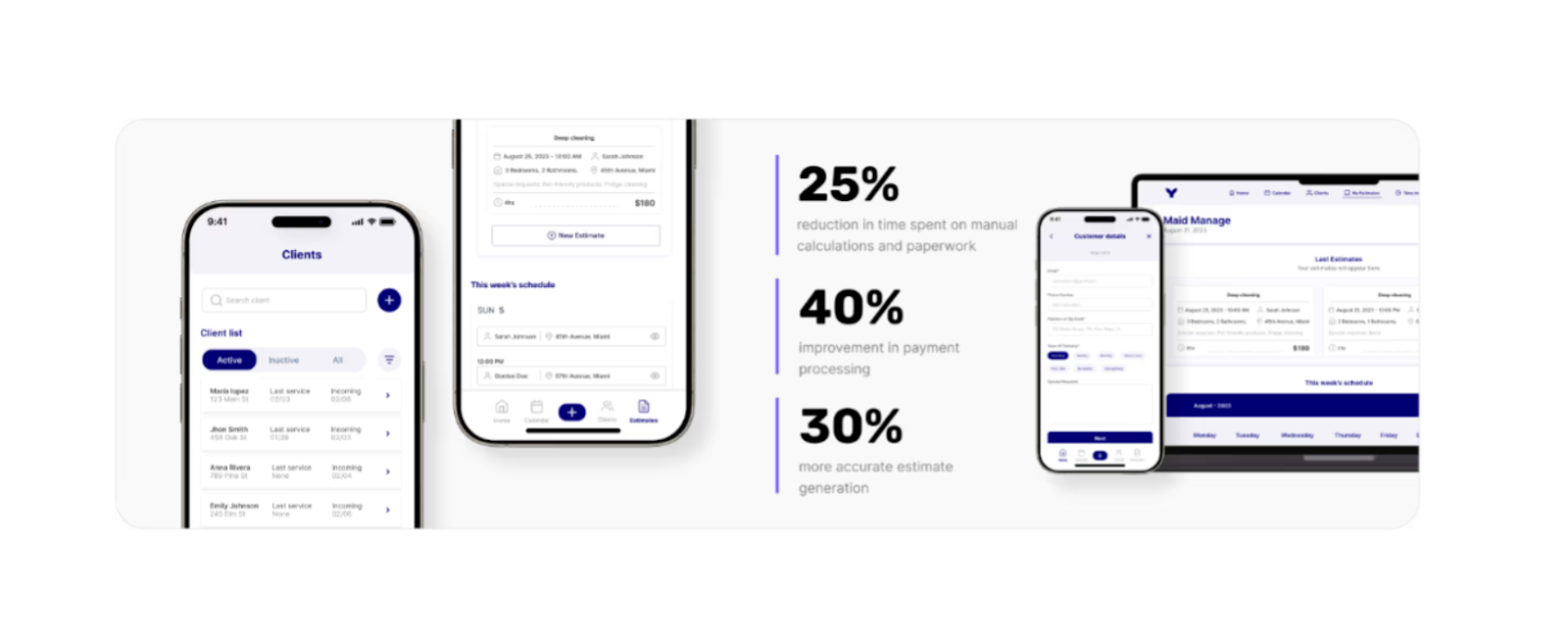
An operations and payments platform for cleaning services that standardized estimates and improved the booking/payment workflow. Built to be simple enough for day-to-day use while making pricing and collections more consistent and professional.
What problem the app solved
Manual pricing and booking workflows created inconsistent estimates, missed appointments, and payment confusion. Workers lost paid time to admin, cash-based collection caused friction, and the overall process undermined trust and professionalism with clients. Off-the-shelf tools were either too complex or not built for the reality of small cleaning ops.
Why Bubble was the right choice
The platform needed custom calculation logic, a scheduling workflow tied to payment events, and a clean, accessible UX for users with varying technical proficiency. Bubble supported quick iteration and product-level control over how pricing, bookings, and collection logic worked end-to-end.
Outcomes or measurable results
The bubble app reduced admin overhead and improved collections: 25% reduction in time spent on manual calculations and paperwork plus 40% improvement in payment processing. It also improved estimate accuracy and client experience by making pricing clearer and the payment flow more reliable.
7. TEN – Marketplaces (services, jobs, products, bookings)
A two-sided staffing marketplace for the event production world, connecting producers and technicians through structured requirements, matching, communication, and protected payments. Built to reduce the chaos and delay of traditional “who-do-you-know” hiring.

What problem the bubble app solved
Producers wasted pre-production time chasing contacts, waiting on replies, and handling last-minute emergencies without a reliable replacement flow. Technicians missed opportunities because hiring relied on word-of-mouth networks. Manual coordination created errors in schedules, requirements, and payments, plus recurring misunderstandings about what each event needed.
Why Bubble was the right choice
A true marketplace required dual experiences (producers vs technicians), custom matching logic, built-in messaging, and structured documentation of requirements and agreements. Bubble allowed product-level flexibility while supporting payment protection via Stripe Connect, which is critical when both sides need trust in the transaction.
Outcomes or measurable results
After launch, the platform reduced producer overhead and sped up hiring cycles: 40% reduction in administrative workload and a 50% increase in efficiency compared to traditional hiring methods. Most positions were filled within 24 hours of posting, and last-minute replacements dropped from days to hours.
8. Copious.Land – Marketplaces (services, jobs, products, bookings)
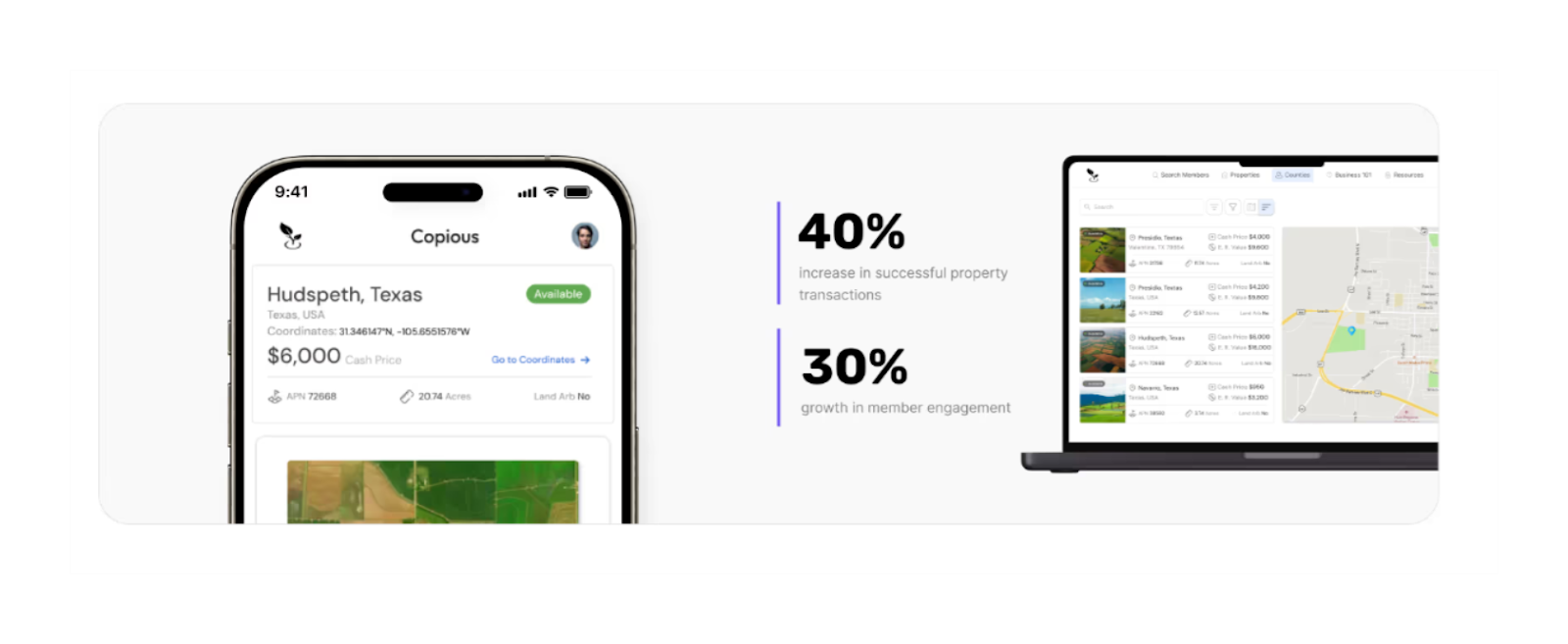
A land investment marketplace MVP built to centralize wholesale property opportunities into a single, searchable platform. Designed to help investors discover, evaluate, and transact faster by replacing fragmented listings with standardized data and geographic context.
What problem the bubble app solved
Land investment opportunities were scattered across social media groups, forums, and informal networks, making market research slow and incomplete. Investors wasted time filtering irrelevant listings, validating inconsistent data, and switching between tools to evaluate locations. Trust between buyers and sellers was also difficult to establish in such a fragmented ecosystem.
Why Bubble was the right choice
The product required a custom marketplace with standardized listing fields, location-based search, integrated satellite views, and secure member-to-member messaging. Bubble allowed the team to build and iterate quickly while supporting complex filtering, mapping integrations, and a community-driven experience in a single MVP.
Outcomes or measurable results
After launch, the platform delivered clear operational impact. Successful property transactions increased as relevant matches became easier to identify, and engagement rose as users spent more time evaluating opportunities directly inside the app. Results included a 40% increase in successful transactions and 30% growth in member engagement.
Features Commonly Used in These Bubble App Examples
Across all the real-world Bubble apps shown above, certain features appear consistently.
These capabilities enable teams to move beyond simple interfaces and build production-ready products that support real operations, complex logic, and long-term scalability.
- User authentication and role-based permissions
Most bubble apps rely on multiple user types with different access levels. Role-based permissions ensure users only see and interact with what’s relevant to them, from admins and operators to clients, contributors, or marketplace participants. - Complex workflows and conditional logic
Advanced workflows handle approvals, state changes, calculations, notifications, and multi-step processes. Conditional logic allows bubble apps to adapt behavior based on user actions, data states, or business rules without hard-coded limitations. - Database-driven dynamic pages
Dynamic pages pull structured data from the database to generate personalized views at scale. This enables bubble apps to support large datasets, custom user experiences, and flexible content without manually creating static pages. - Dashboards and reporting views
Dashboards provide real-time visibility into operations, performance, and progress. These views centralize key metrics, status indicators, and actionable insights tailored to each role within the platform. - Payments, subscriptions, and billing logic
Many products include payments, recurring subscriptions, or marketplace transactions. Billing logic supports pricing tiers, commissions, invoicing, and payment flows while integrating securely with external providers. - API integrations and external services
Bubble apps frequently connect with third-party tools through APIs to sync data, trigger actions, or extend functionality. Common integrations include CRMs, databases, analytics tools, and industry-specific platforms. - AI integrations and automation logic
AI-powered features automate research, analysis, content generation, or decision support. These integrations often combine external AI APIs with internal workflows to create intelligent, user-facing experiences. - Responsive web app design
All examples are built as responsive web apps that adapt across devices. Layouts, interactions, and performance are optimized to ensure usability on desktop, tablet, and mobile without maintaining separate codebases.
Read more | Top Bubble agencies
Tools and Integrations Used in Bubble App Examples
To support real business operations, Bubble apps are rarely built in isolation. The examples above rely on a combination of external tools and integrations to extend functionality, automate workflows, and connect the product to the rest of the business ecosystem.
- API integrations with third-party platforms
Custom API connections allow bubble apps to send, receive, and sync data with external platforms. This enables seamless interaction with CRMs, internal systems, industry-specific software, and other services that the business already depends on. - Automation tools like Zapier and Make
Automation platforms are used to trigger actions across tools without manual intervention. Common use cases include syncing records, sending notifications, updating external systems, or orchestrating multi-step workflows across bubble apps. - AI services and data processing tools
AI APIs are integrated to power features like document analysis, content generation, research assistance, and intelligent recommendations. These services are often combined with internal logic to automate complex, data-heavy tasks. - Payment gateways and billing systems
Payment providers enable one-time payments, subscriptions, and marketplace transactions. Integrations support billing logic such as pricing tiers, commissions, refunds, and secure payment flows for users and vendors. - Email, messaging, and notification tools
Communication tools handle transactional emails, reminders, alerts, and in-app notifications. These integrations help keep users informed and engaged throughout key workflows and lifecycle moments. - Analytics, tracking, and reporting tools
Analytics integrations provide visibility into user behavior, performance metrics, and conversion flows. Teams use these insights to monitor adoption, identify friction points, and guide ongoing product iteration. - External databases and enterprise systems
Some bubble apps connect to external databases or enterprise-grade systems to improve scalability and data reliability. These integrations support higher data volumes, advanced querying, and long-term growth beyond the core app.
Read more | How to hire Bubble developers
Business Impact of Real Bubble Apps
Beyond features and integrations, the real value of Bubble apps shows up in measurable business outcomes.
The examples above demonstrate how teams use Bubble to move faster, reduce risk, and build products that support growth without the overhead of traditional development.
- Faster product launch compared to traditional development
Teams can move from idea to production in weeks instead of months. This speed allows businesses to respond to market opportunities quickly and start learning from real users earlier. - Lower development and iteration costs
Bubble reduces the cost of building and updating products by eliminating large engineering teams and long development cycles. Changes can be made without rebuilding core infrastructure, keeping iteration affordable. - Ability to test, validate, and pivot quickly
Products can be launched as MVPs, tested with real users, and refined based on feedback. This approach minimizes wasted investment and helps teams focus on features that drive real value. - Scalable architecture for growing products
Well-structured Bubble apps are built to scale with usage, data volume, and feature complexity. As products grow, teams can expand functionality without starting over or introducing unnecessary technical debt. - Easier long-term maintenance and iteration
Ongoing improvements are simpler to manage thanks to visual workflows and centralized logic. This makes long-term maintenance more predictable and enables continuous product evolution as business needs change.
Read more | Bubble MVP app development
Bubble vs Other No-code Tools
Choosing the right no-code platform depends on the type of product you’re building, the level of complexity involved, and how far you expect the product to scale. Bubble is a strong fit for many scenarios, but it’s not the best option for every use case.
Where Bubble Works Best
- SaaS products and web applications
Bubble excels at building full-featured SaaS platforms with authentication, subscriptions, dashboards, and complex user journeys that evolve over time. - Marketplaces with complex logic
Multi-sided marketplaces benefit from Bubble’s flexibility around roles, permissions, workflows, payments, and custom business rules. - AI-powered and data-heavy apps
Bubble apps that rely on AI APIs, document processing, advanced filtering, or multi-step backend logic are well suited to Bubble’s architecture. - Custom workflows and backend logic
When products require non-standard flows, conditional logic, automation, or deep integrations, Bubble offers the control needed to model real operations. - Startups and growing businesses
Bubble supports fast MVP launches while providing enough structure to scale into production-ready products without rewriting everything later.
When Bubble Is Not the Right Fit
- Simple mobile-first or mobile-only apps
If the product is primarily mobile and doesn’t require heavy backend logic, Bubble may be more complex than necessary. - Lightweight data tools
For simple tools that mainly visualize or edit structured data with minimal logic, Bubble can be overkill. - Apps that need native mobile performance
Products that depend on advanced device features, smooth animations, or offline-first behavior often require a more mobile-native approach.
Read more | How we build an AI-powered app with Bubble
DIY vs Build With Experts
Building with Bubble gives founders speed and flexibility—but how you build matters as much as what you build. This section is about making a clear, informed decision between going DIY and working with an experienced product team.
Cons of DIY Bubble Apps
- Poor database and architecture decisions
Early DIY builds often start without a clear data model or long-term structure. What works for a few users can quickly become hard to extend, making simple changes risky and time-consuming as the product grows. - Performance and scaling issues later
Bubble apps built without scalability in mind tend to slow down as data volume and usage increase. Fixing performance problems later usually requires refactoring core logic instead of incremental improvements. - Security and permission mistakes
Misconfigured privacy rules and role logic are common in DIY bubble apps. These issues can expose sensitive data, break user trust, or force urgent fixes once the product is already live. - High rebuild costs after MVP
Many DIY MVPs validate the idea but can’t support real operations. At that point, teams often need a partial or full rebuild, costing more time and money than doing it properly from the start.
Why Build Bubble Apps With LOW/CODE Agency
- Product-first approach, not just development
Every build starts with understanding workflows, users, and business goals. The focus is on designing a product that supports real operations, not just shipping features. - Experience building production-grade Bubble apps
With multiple live products across SaaS, marketplaces, AI tools, and internal systems, the team brings proven patterns for architecture, permissions, and performance. - Focus on scalability, adoption, and long-term use
Bubble apps are designed to evolve. That means clean data models, clear role logic, and decisions that reduce friction for users while keeping the product stable as usage grows.
If you’re serious about turning a Bubble app into a real product, one that supports real users, scales with your business, and doesn’t need to be rebuilt six months later, it’s worth designing it properly from day one.
At LOW/CODE Agency, We work as a product team, not just builders. If you’re evaluating Bubble for something that matters operationally or commercially, let’s talk and map out what building it right would actually look like.
Conclusion
Bubble apps can power much more than simple prototypes. Today, they are used to launch real SaaS products, marketplaces, AI tools, internal systems, and scalable MVPs that support real users and real revenue. When built with the right structure, Bubble lets teams move fast while still planning for performance, flexibility, and long-term growth.
If these examples sparked ideas, the next step is turning them into a clear plan. At LOW/CODE Agency, we help teams move from inspiration to execution by defining the right use case, scope, and architecture from day one.


Related Articles
- 13 Types of Apps You Can Build With Bubble (2026)
- How to Choose a Bubble Agency (What to Check Before Hiring)
- Bubble Capabilities and Limits (Explained for Real Projects)
- Glide OpenAI Integration: Complete Practical Guide
- Bubble vs WeWeb | 12 Factors to Decide the Best One
- Webflow: A guide to the leading no-code web development platform
Last updated on
September 3, 2026
.

Jesus is a visionary entrepreneur and tech expert. After nearly a decade working in web development, he founded LOW/CODE Agency to help businesses optimize their operations through custom software solutions.


FAQs
Can Bubble be used to build SaaS products?
Are Bubble apps scalable for large user bases?
Can Bubble handle AI features and automation?
How complex can a Bubble app be?
Can Bubble apps be used for public-facing platforms?
What types of businesses use Bubble apps the most?
Related Articles
Bubble
Comparison
Bubble.io vs WordPress | 17 Factors to Decide the Best One
Compare Bubble.io vs WordPress across 17 key factors to choose the best platform for building your website or web app in 2025

Bubble
How to Build a Consulting Marketplace App with Bubble
Build a consulting marketplace with Bubble. Match clients with experts, handle bookings and billing — a full platform without a development team.

Bubble
How to Build a Sales Dashboard App with Bubble
Build a sales dashboard with Bubble. Real-time pipeline visibility, rep performance, and revenue forecasting — a custom view without BI tool costs.

Bubble
How to Build an Assessment Platform App with Bubble
Create an assessment platform with Bubble no coding required. Build quizzes, track results & evaluate learners step-by-step using no-code tools.


Why customers trust us for no-code development


