

How to Build Workforce Management Apps Using Low-code
16 min
read
Learn how to build workforce management apps using low-code, covering features, workflows, integrations, costs, and best practices for scalable teams.

Why Companies Build Workforce Management Apps
Workforce management apps are built to bring structure to how people, time, and work are coordinated. As teams grow, manual systems stop scaling and visibility breaks down.
- What workforce management apps actually handle
These apps manage scheduling, attendance, task assignment, approvals, availability, and performance signals. They act as a single system where managers and employees see the same data and rules. - Common problems these apps solve in growing teams
Growing teams face missed shifts, unclear ownership, delayed approvals, and inconsistent data. A workforce app centralizes decisions so work keeps moving without constant follow-ups. - Why spreadsheets and legacy tools stop working
Spreadsheets lack real-time updates, permissions, and audit trails. Legacy tools are rigid and hard to adapt. Both fail when processes change or teams scale quickly. - When a custom app makes more sense than buying software
Off-the-shelf tools work until workflows become unique. A custom low-code app fits your exact rules, roles, and integrations without forcing teams to adapt to generic software.
When coordination becomes a daily struggle, a workforce management app restores clarity and control. Low-code makes it possible to build one that fits how your team actually works.
Why Low-code Is a Good Fit for Workforce Management Apps
Workforce needs change faster than most software can keep up. Low-code works well here because it lets teams adapt processes without rebuilding systems every time something shifts.
- Speed vs traditional development
Low-code platforms reduce build time dramatically. Teams can launch scheduling, attendance, or approval features in weeks instead of months, which matters when workforce issues are already slowing operations. - Flexibility compared to off-the-shelf tools
Prebuilt workforce tools force teams into fixed workflows. Low-code lets you design rules, roles, and logic around how your workforce actually operates, not how a vendor assumes it should. - Easier iteration as workforce needs change
Shift rules, policies, and team structures evolve often. Low-code makes it easier to adjust logic, permissions, and flows without long engineering cycles or risky rewrites. - Better ownership for internal teams
HR and operations teams can collaborate directly on improvements instead of waiting on developers. This keeps the app aligned with real needs instead of outdated requirements.
When workforce management demands speed and adaptability, low-code provides control without complexity. It lets teams build systems that evolve alongside the workforce instead of falling behind it.
Read more | Low-code Employee App Development Guide
Core Features Every Workforce Management App Should Include
A workforce management app only works when it reflects how people actually work day to day. These core features form the foundation that keeps teams aligned, accountable, and informed.
Employee Profiles and Role Management
- Employee records and org structure
The app should maintain a single, accurate record for each employee, including role, team, location, and reporting lines. This becomes the base layer for scheduling, approvals, and access control. - Role-based access and permissions
Different roles need different access. Managers approve and view reports, employees submit requests, and admins configure rules. Clear permissions prevent confusion and protect sensitive data. - Manager vs employee views
Managers need oversight and controls, while employees need simplicity. Separate views ensure each group sees only what is relevant to their responsibilities.
Time, Attendance, and Leave Management
- Clock-in and clock-out tracking
The app should capture work hours reliably, whether shifts are fixed or flexible. Accurate time tracking supports payroll, compliance, and workload planning. - Leave requests and approvals
Employees should request leave easily, and managers should approve with clear context. Automated rules reduce back-and-forth and prevent policy violations. - Absence and overtime visibility
Real-time visibility into absences and overtime helps managers plan coverage and avoid burnout or compliance issues.
Scheduling and Shift Planning
- Shift creation and assignment
Managers need tools to create shifts, assign staff, and balance workloads based on availability and skills. - Conflict and availability handling
The system should flag conflicts automatically, such as overlapping shifts or unavailable employees, before schedules are published. - Schedule change notifications
When schedules change, employees must be notified instantly. Clear communication prevents missed shifts and last-minute confusion.
When these core features are designed well, workforce management stops being reactive. Teams gain clarity, predictability, and trust in the system they rely on every day.
Task and Work Assignment
- Task creation and ownership
Managers should be able to create tasks, assign clear owners, and link work to teams or shifts. Clear ownership removes confusion and prevents tasks from being ignored or duplicated. - Status tracking and updates
Tasks need visible statuses like pending, in progress, and completed. This helps managers understand progress without constant check-ins and gives employees clarity on expectations. - Priority and deadline management
Not all work is equal. Priority levels and due dates help teams focus on what matters most and avoid last-minute rush or missed commitments.
Reporting and Workforce Insights
- Attendance and productivity dashboards
Dashboards should show hours worked, absences, and trends over time. This helps managers spot issues early instead of reacting after problems appear. - Team-level and role-level insights
Different teams work differently. Role-based insights help leaders understand workload balance, staffing gaps, and performance patterns across the organization. - Export and audit support
Reports should be easy to export for payroll, compliance, or audits. Clear records reduce manual reporting work and support accountability.
When tasks and insights live in one system, managers spend less time chasing updates. Workforce decisions become data-driven instead of guesswork.
Read more | BPA Problems Automated With Low-code
Steps to Build a Workforce Management App Using Low-code
This section explains the build process in a clear, practical way. We focus on decisions you must make before writing logic or screens. When these steps are done right, low-code becomes a real advantage instead of a shortcut.
Step 1: Define Users, Roles, and Workflows
Before you design screens or pick tools, you must be clear about who will use the app and how work moves between them. Workforce apps fail when roles are vague or permissions are mixed.
- Admin, manager, and employee roles
Admins manage system rules, managers approve and plan work, and employees submit data. Each role must see only what they need. This keeps the app simple and avoids mistakes. - Approval flows and responsibilities
Decide who approves leave, shifts, and changes. Define what happens if someone is absent. Clear approval logic prevents delays and confusion as teams grow. - Clear ownership of each process
Every action must have one owner. When ownership is unclear, tasks stall and data becomes unreliable. Low-code tools work best with clear responsibility paths.
Step 2: Choose the Right Low-code Stack
Your tool choice should match how your workforce actually operates. Do not start with platforms. Start with usage and constraints.
- Mobile vs web requirements
Field teams often need mobile-first access, while office teams prefer dashboards. Some teams need both. Choose a low-code stack that supports real usage patterns. - Integration needs (HR, payroll, calendars)
Workforce apps rarely work alone. You may need to sync payroll, holidays, or schedules. Check integration limits early to avoid rework later. - Scalability and data limits
Understand record limits, automation limits, and performance rules. A workforce app grows fast as attendance and task data increase daily.
Step 3: Design the Data Structure
A clean data model is the backbone of any workforce management app. Low-code platforms move faster when data is structured correctly from day one.
- Employees, shifts, tasks, attendance
Define each data type clearly. Avoid mixing concepts. Separate records keep reporting accurate and workflows flexible. - Relationships between data types
Link employees to shifts, tasks, and attendance logs. Clear relationships allow managers to see real-time status without manual tracking. - Data validation rules
Set rules to prevent bad data, like duplicate clock-ins or missing approvals. Validation protects trust in reports and decisions.
When these three steps are done with care, building the rest of the workforce management app becomes faster, safer, and easier to scale with low-code.
Step 4: Build the User Interface
The user interface decides whether your workforce management app is adopted or ignored. Even the best logic fails if daily actions feel slow or confusing. In low-code, UI design is not just visual. It defines how work actually happens.
- Employee self-service screens
Employees should clock in, request leave, view shifts, and update tasks in a few taps. Keep screens focused on one action at a time. Fewer choices reduce errors and support daily use. - Manager dashboards
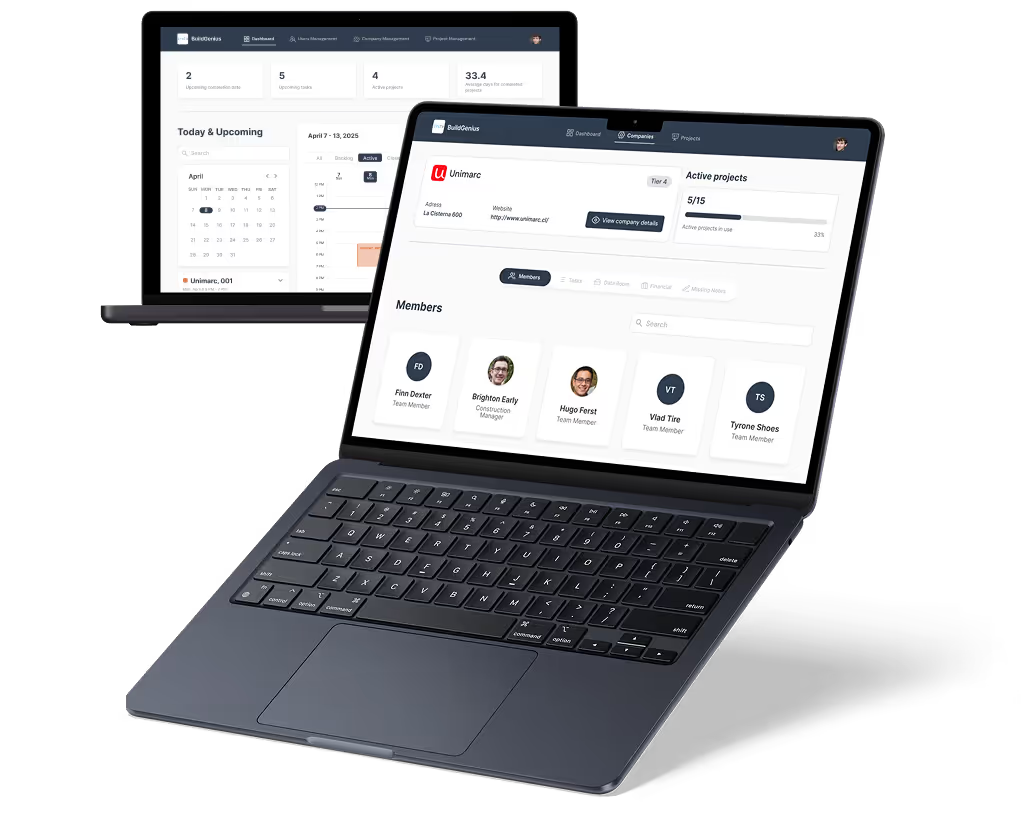
Managers need visibility, not clutter. Dashboards should show attendance gaps, pending approvals, upcoming shifts, and workload status. Good dashboards help managers act fast without digging through data. - Admin control panels
Admins manage rules, roles, and system changes. Control panels must be structured and safe, with clear sections for permissions, policies, and global settings to avoid accidental changes.
Step 5: Configure Workflows and Automations
This is where low-code delivers real value. Automations reduce manual follow-ups and make the app reliable even when teams are busy or distributed.
- Approval workflows
Set clear paths for leave requests, shift changes, and task sign-offs. Define what happens at each step so requests never get stuck waiting for human intervention. - Notifications and reminders
Automated alerts keep everyone aligned. Employees get reminders, managers get alerts for pending actions, and admins get system-level updates without chasing people manually. - Status-based logic
Actions should change automatically based on status. Approved leave updates schedules. Missed clock-ins trigger alerts. Status logic keeps data consistent across the system.
Step 6: Test with Real Scenarios
Testing must reflect real-life behavior, not perfect flows. Workforce apps face edge cases every day, and low-code makes it easier to fix issues early if you test properly.
- Edge cases and exceptions
Test late check-ins, missed approvals, overlapping shifts, and role changes. These situations reveal gaps that normal testing often misses. - Role-based access testing
Log in as each role and verify visibility. Employees should not see admin controls. Managers should not access global settings. Access errors break trust fast. - Data accuracy checks
Compare reports with raw entries. Validate totals, hours, and approvals. If data looks wrong, adoption drops quickly.
Step 7: Launch, Monitor, and Improve
A workforce management app is never finished. Launch is the start of learning how teams really use the system.
- Phased rollout
Start with a small team or department. This limits risk and gives you clean feedback before full deployment across the organization. - Feedback loops
Collect feedback directly inside the app or through short check-ins. Users will show you where friction exists if you listen early. - Ongoing iteration
Policies change, teams grow, and workflows evolve. Low-code allows you to adjust logic, screens, and automations without rebuilding everything from scratch.
When these steps are handled carefully, you end up with a workforce management app that supports real operations, not just planned workflows.
Read more | Low-code BPA Examples Using Make
Common Workforce Management App Use Cases Built with Low-code
Most workforce management apps exist to fix daily operational pain, not to add new features. Teams usually start with spreadsheets, emails, and chat messages, then realize those tools do not scale.
- Employee self-service apps
These apps let employees manage their own actions like clock-ins, leave requests, shift visibility, and task updates without relying on HR or managers. This reduces daily questions, improves data accuracy, and builds trust because employees see real-time information instead of outdated spreadsheets. - Manager approval dashboards
Approval dashboards give managers one place to review leave requests, shift changes, attendance issues, and workload status. Instead of chasing emails, managers act quickly with clear context. This keeps approvals consistent and prevents delays as team size increases. - Shift planning tools
Shift planning tools help teams assign work based on availability, role, location, and labor rules. Conflicts like overlapping shifts or missing coverage are handled by logic instead of memory. This is especially useful for operations with rotating schedules or hourly workers. - Mobile apps for field workers
Field teams need fast, simple mobile access for check-ins, task updates, photo uploads, and status reporting. Low-code mobile apps support offline work and quick updates, making them practical for logistics, construction, healthcare, and on-site service teams. - Internal workforce analytics tools
Analytics tools turn attendance, shift, and task data into clear insights like overtime trends, absenteeism, and workload balance. Leaders can spot problems early instead of reacting late. Because data is already structured, reports are easier to adjust as needs change.
This structure reflects how teams actually use workforce management apps in day-to-day operations, which is why low-code fits these use cases so well.
Read more | Top 6 Automation Agencies
Integration Considerations for Workforce Apps
Workforce management apps rarely work in isolation. They sit in the middle of HR, payroll, scheduling, and daily operations. If integrations are not planned early, teams end up duplicating data, fixing sync issues, and losing trust in the system.
- HRIS and payroll system integration
Your workforce app must share employee data, attendance, and leave information with HRIS and payroll systems. This avoids double entry and payroll errors. Clear sync rules decide which system is the source of truth. - Calendar syncing for shifts
Shift data should sync with personal and team calendars so employees always know when they are working. Real-time updates prevent missed shifts and reduce manual reminders when schedules change. - Single sign-on and authentication
SSO simplifies access and improves security by letting users log in with existing company accounts. This reduces password issues and ensures access updates automatically when roles or employment status change. - Data security and access control
Sensitive workforce data must be protected through role-based access, permissions, and audit logs. Each user should see only what they are allowed to see. Strong access control builds trust and supports compliance needs.
When integrations are planned with operations in mind, workforce apps stay reliable as teams grow and systems evolve.
Read more | Business Process Automation Benefits
Mobile and Field Workforce Considerations
Workforce apps often fail when they are designed only for desks and laptops. Field teams work in motion, with limited time, unstable networks, and small screens. If the app does not respect these realities, adoption drops fast.
- Mobile-first design
Mobile-first means designing for thumbs, short attention spans, and quick actions. Screens should focus on one task at a time, with large touch targets and minimal typing. This helps field workers complete actions quickly without frustration. - Offline access and sync
Many field teams work in areas with poor or no internet. Offline access allows them to clock in, update tasks, or capture data without connectivity. Once online, the app syncs automatically, keeping records accurate and complete. - Push notifications
Push notifications keep field workers informed without forcing them to open the app constantly. Alerts for shift changes, new tasks, or missed actions help teams respond quickly and reduce manual follow-ups from managers. - Location-based workflows (when relevant)
Some roles benefit from location awareness, such as site check-ins or job completion tracking. Location-based logic should be used carefully, only when it adds real value and respects privacy and operational needs.
Designing with these considerations ensures your workforce app supports real field conditions instead of fighting against them.
Read more | Business Process Automation Challenges
Common Mistakes When Building Workforce Management Apps
Many workforce management apps fail not because of technology, but because of early decisions made without enough operational clarity. Low-code makes building faster, but it does not fix unclear thinking. The mistakes below are common when teams rush into development without aligning workflows, roles, and real usage patterns.
- Automating broken processes
If the current process is messy, automation only makes the mess faster. Before building anything, workflows must be simplified and clarified. Low-code works best when it supports clean, intentional processes. - Ignoring role clarity
When admins, managers, and employees see too much or too little, confusion follows. Unclear roles lead to permission issues, data leaks, and poor adoption. Role definitions should come before screen design. - Overloading the first version
Trying to include every feature at launch slows development and overwhelms users. A strong first version focuses on core daily actions. Low-code allows iteration, so it is safer to start small and expand. - Skipping mobile needs
Many teams assume users will adapt to desktop tools. Field workers rarely do. Ignoring mobile-first design leads to low usage and workarounds outside the system, which breaks data accuracy. - Poor integration planning
Late integration decisions cause duplicated data, manual fixes, and trust issues. Workforce apps must connect cleanly with HR, payroll, and calendars from the start to stay reliable as teams grow.
Avoiding these mistakes helps ensure your workforce management app becomes a trusted system, not another tool teams work around.
Read more | Business Process Automation Examples
How LOW/CODE Agency Builds Workforce Management Apps
At LOW/CODE Agency, we do not start with screens or features. We start by understanding how your workforce actually operates today and where things break as you grow.
Workforce management apps sit at the center of daily work, so clarity matters more than speed. We use low-code to move fast only after the direction is right.
- Product-first discovery and planning
We map real workflows, roles, approvals, and edge cases before building anything. This helps us avoid automating broken processes and ensures the system reflects how your teams truly work, not assumptions. - Building scalable low-code architectures
We design data models, permissions, and logic that scale with your organization. Whether you are managing a small team or hundreds of employees, the structure supports growth without constant rework. - Combining apps, workflows, and automation
We build complete workforce systems, not isolated apps. Employee self-service, manager dashboards, admin controls, and automations all work together to replace spreadsheets, emails, and manual follow-ups. - Long-term iteration and support mindset
Workforce rules change over time. We stay involved after launch to refine workflows, add modules, and improve adoption as your operations evolve. The system grows with you instead of holding you back.
We have built 450+ custom apps and internal systems for teams that rely on software every day. If you want to replace fragmented workforce tools with a clear, scalable system, we can help you plan and build it the right way.
Conclusion
Workforce management apps should reduce friction in daily work, not add new layers of complexity. When built with the right structure, they bring clarity to roles, approvals, and operations instead of creating more tools to manage.
Low-code makes this possible by allowing faster learning, testing, and iteration as teams grow. The best workforce apps start simple, focus on real usage, and evolve based on how people actually work.

Related Articles
- Custom Webflow Website vs Templates
- Low-code CMS Development Guide for Startups
- How to Build User-Friendly Websites Using Low-code
- 35 Low-code Automation Ideas Using Make for BPA
- 10 BPA Problems You Can Automate with Low-code
- Low-code Employee App Development Guide
Looking to build a mobile app? Our mobile app development services handle everything from design to deployment.
Ready for a custom-built app? Our custom app development services are built around your requirements.
Last updated on
September 24, 2026
.

Jesus is a visionary entrepreneur and tech expert. After nearly a decade working in web development, he founded LOW/CODE Agency to help businesses optimize their operations through custom software solutions.


FAQs
Can workforce management apps be built fully with low-code?
Are low-code workforce apps secure for employee data?
How long does it take to build a workforce management app?
Can these apps integrate with payroll and HR systems?
Do low-code workforce apps scale with growing teams?
When should you hire a low-code agency for workforce apps?
Related Articles

AI
Custom App Development
How to Build an AI App for Restaurant Business
Learn how to build an AI app for your restaurant business to boost sales, streamline operations, and deliver a smarter, faster customer experience

No-code/Low-code
Mobile App Development
Low-code Mobile App Development Cost in 2026
Discover low-code mobile app development costs in 2026 with real price ranges. See what affects cost, timelines, features, and how to reduce spend.
No-code/Low-code
Rapid Web App Development | Tools, Steps, & Best Practices
Build and launch web apps faster with top tools, proven steps, and no-code best practices—without sacrificing quality or user experience

Business Automation
Custom App Development
Business Application Development (How to Build One in 2026)
Learn how to build a business application in 2026. Explore step-by-step development, tools, costs, and best practices to launch faster and scale with confidence.

Why customers trust us for no-code development


