

Webflow SEO Checklist Before You Go Live
The pre-launch Webflow SEO checklist — meta tags, redirects, sitemaps, structured data, and what to verify in Search Console.

A Webflow SEO checklist is not optional. Webflow's SEO capabilities are strong, but they only work if someone configures them correctly before launch. Skipping pre-launch SEO checks can undo months of content work in a single publish event.
The most common post-launch SEO crises are not algorithm updates or competitive changes. They are configuration mistakes that a systematic pre-launch review catches in minutes.
For expert Webflow development services, LOW/CODE Agency delivers fast, conversion-focused builds for businesses ready to move off template platforms.
Key Takeaways
- Staging noindex must be removed: The most common launch-day SEO mistake is publishing a site that blocks indexing because staging settings were never changed.
- Redirects must be live before launch: Missing 301 redirects on a migrated site can wipe out years of accumulated link equity and organic rankings.
- Every key page needs unique title and meta description: Default or duplicate metadata reduces click-through rates and signals poor content quality to search engines.
- Google Search Console must be verified before launch: Without prior verification, you cannot monitor indexing errors in the critical first weeks after launch.
- Sitemap submission is a post-launch first step: Submitting an XML sitemap to Search Console immediately after launch accelerates page discovery.


Why do Webflow sites have launch-day SEO problems?
Most Webflow launch SEO issues are avoidable configuration mistakes, not platform limitations. Webflow's SEO foundation is strong: theproblems arise when configuration is left to chance rather than treated as a defined project phase.
Understanding where SEO fits in your project before build begins is the most effective way to ensure the configuration happens at the right time rather than being rushed before launch.
- Staging versus production settings: Webflow applies a "Discourage search engines" setting automatically in staging. This must be removed before publishing to a live domain.
- Migration sites face higher risk: Sites moving from an existing platform carry an additional risk layer: missing redirects, duplicate content, and lost meta data all affect organic rankings from day one.
- SEO settings versus SEO strategy: Webflow provides the settings; configuring them correctly requires informed decisions about metadata, URL structure, and canonical tag logic.
- When configuration should happen: SEO configuration is a build-phase task: setting up meta fields, redirect maps, and canonical tags during development rather than scrambling at launch.
Build SEO checks into your project timeline explicitly. Do not treat them as a post-build cleanup task.
What indexing and crawlability checks must you complete?
Indexing checks determine whether Google can find and index your site at all. A perfectly designed site that blocks search engines is invisible from launch day.
- Remove staging noindex: Go to Webflow's Hosting settings and confirm that "Discourage search engines from indexing this site" is unchecked before publishing.
- Check robots.txt: Visit yourdomain.com/robots.txt and confirm there are no Disallow rules blocking important pages or sections.
- Verify canonical tags: Confirm that canonical tags on key pages point to the correct production URL, not a staging URL or an incorrect variant.
- Check for unintentional noindex tags: Review any pages that should be indexed but may have been set to noindex during development: particularly landing pages and CMS collection pages.
- Verify Search Console ownership: Confirm that your production domain is verified in Google Search Console before launch, not after you notice indexing problems.
Run these five checks in order. A single failure in this list can render an entire Webflow site invisible to search engines.
What on-page SEO elements should you audit on every page?
On-page SEO auditing is a per-page process. Each key page requires individual attention: automated tools can surface missing fields, but they cannot write effective metadata.
- Unique page title (under 60 characters): Every indexed page needs a unique, keyword-targeted title. Duplicate titles across multiple pages reduce click-through rates and create search engine confusion.
- Meta description (under 160 characters): Write compelling, action-oriented meta descriptions for every key page: theseare not ranking factors but directly affect click-through rates from search results.
- Exactly one H1 per page: Every page should have a single H1 tag containing the primary keyword. Multiple H1s or missing H1s are common Webflow build oversights.
- Image alt text for all meaningful images: Alt text serves both accessibility and SEO purposes. Decorative images may use empty alt attributes; informational images require descriptive text.
- Clean URL slugs: Confirm that page slugs are lowercase, hyphen-separated, and free of parameters, subfolders, or auto-generated alphanumeric strings.
Use Screaming Frog (free up to 500 URLs) to crawl staging and identify missing or duplicate metadata at scale before doing manual reviews.
How do you handle redirects and URL changes at launch?
Redirect management is the highest-risk pre-launch SEO task for any site that is migrating from an existing platform. Missing redirects transfer no link equity and produce 404 errors that damage organic rankings.
- Export a full URL list from your current platform: Use a crawl tool or platform export to generate a complete list of every URL currently indexed on your live site.
- Map old URLs to new Webflow URLs: For every existing URL, identify its equivalent in the new Webflow site structure. This mapping becomes your 301 redirect document.
- Set up 301 redirects in Webflow hosting settings: Enter every redirect into Webflow's Hosting settings before the DNS cutover, not after launch.
- Test redirects on staging before going live: Confirm that every mapped redirect resolves correctly to the intended destination in your staging environment.
- What happens without redirects: Unmapped URLs return 404 errors on launch day. Every page with inbound links that returns a 404 loses all accumulated link equity immediately.
For a site with more than 50 pages, redirect mapping should be a dedicated project task with a defined timeline, not a same-day activity before launch.
What technical SEO elements should you verify in Webflow?
Technical SEO verification covers the platform-level configuration that affects how search engines process and understand your site's content.
- XML sitemap generation: Confirm your sitemap is accessible at yourdomain.com/sitemap.xml and contains all pages you want indexed. Webflow generates this automatically, but verify it reflects your expected page list.
- Open Graph tags: Verify that Open Graph title, description, and image are configured on key pages for correct social sharing previews. These are separate from SEO meta fields in Webflow.
- Structured data where applicable: If your site includes product pages, FAQs, articles, or reviews, implement the appropriate JSON-LD schema markup via Webflow's custom code embed.
- Core Web Vitals status: Run PageSpeed Insights on your five most important pages before launch. Target LCP under 2.5 seconds and CLS under 0.1 as minimum standards.
- HTTPS and no mixed content: Confirm that all page resources load via HTTPS. Mixed content warnings (HTTP images on an HTTPS page) create browser security warnings that reduce user trust.
Technical SEO verification requires tools, not just visual inspection. PageSpeed Insights, Screaming Frog, and Google Search Console together cover the full technical audit scope.
How does SEO checking fit into the broader QA process?
SEO checking is most effective when treated as a defined layer within the QA phase rather than a separate post-QA activity. The staging environment is where SEO issues should be resolved, not the live site.
Knowing how to include SEO in your QA process prevents the common pattern of functional testing being completed and the site being launched before anyone has checked the SEO configuration.
- When to run SEO checks: Complete SEO checking during the QA phase, on the staging environment, with at least one week before the planned launch date.
- Tools for SEO audit: Screaming Frog for metadata crawl, Google PageSpeed Insights for performance, and Google Search Console for indexing verification.
- Who owns the SEO QA step: Assign a named owner for SEO sign-off before launch, either the agency, an in-house SEO specialist, or a designated marketer trained in the checklist.
- Document issues found: Record every SEO issue in the shared QA log alongside functional bugs: do not manage them through separate email threads.
- Track to resolution: Every SEO issue documented should have a confirmed resolution status before the launch sign-off meeting is scheduled.
If SEO QA is not on the launch sign-off checklist, it will be skipped under launch deadline pressure.
How do you raise SEO issues found during the build?
SEO issues discovered during the build phase need to be communicated clearly and promptly to prevent them from becoming launch-day surprises. The process matters as much as the finding.
Knowing how to flag SEO issues during build with sufficient context for the development team prevents miscommunication and revision conflicts.
- Document with specificity: Record the page URL, the specific SEO element affected, and the recommended fix. Vague "the SEO looks off" feedback creates follow-up rounds, not resolutions.
- Distinguish in-scope fixes from scope additions: A missing canonical tag is an in-scope fix. A request to restructure the URL taxonomy mid-build is a scope change requiring a change order.
- Timing: Raise SEO issues as soon as they are identified: mid-build fixes are cheaper than pre-launch fixes, which are cheaper than post-launch fixes.
- Use staging for SEO review: Review SEO configuration on the staging environment before final QA begins, not during or after it.
- Avoid creating revision conflicts: Send batched SEO feedback in a single document rather than raising individual issues across multiple messages and channels.
The staging environment exists specifically for this purpose. Use it before the site goes live, not after.
What additional SEO steps do enterprise Webflow sites need?
Enterprise sites carry additional SEO complexity that standard pre-launch checklists do not fully address. The scale of content, international requirements, and governance layers all add SEO surface area that needs explicit planning.
Understanding enterprise SEO launch requirements before the build begins prevents the compressed pre-launch scramble that produces configuration errors on large, high-traffic sites.
- Hreflang configuration: Multi-language or multi-region sites require hreflang tag implementation on every locale page, pointing to the correct regional equivalent.
- Large-scale redirect mapping: Sites with thousands of existing URLs require a systematic redirect mapping process that cannot be completed manually within a standard QA timeline.
- Crawl budget management: Large Webflow sites with thousands of CMS items require robots.txt configuration and sitemap structuring to guide crawler allocation efficiently.
- Specialist sign-off: Enterprise SEO launches typically require sign-off from an SEO specialist in addition to the standard development and design review process.
- Analytics infrastructure integration: Connecting Webflow's analytics layer to enterprise tools such as Adobe Analytics or Segment requires technical coordination between the Webflow team and the analytics team before launch.
Enterprise SEO launch requirements add one to two weeks to the pre-launch timeline. Build that buffer in from the start.
What SEO monitoring should you run in the days after launch?
Launch day is not the end of SEO work. The first seven to fourteen days after launch are the highest-risk period for SEO problems that need active monitoring to detect and resolve.
Setting up post-launch SEO monitoring before launch day means you have visibility into problems within hours rather than discovering them weeks later through traffic declines.
- Search Console coverage report: Monitor the Coverage report daily in the first week to detect unexpected 404 errors, indexing blocks, or noindex signals that should not be there.
- Crawl error alerts: Configure email alerts in Search Console for new crawl errors so you are notified immediately rather than discovering them on the next manual check.
- Organic traffic baseline comparison: Measure organic traffic in the first week against the same period in the previous month to identify any unexpected drops that require investigation.
- Redirect resolution verification: Spot-check key redirects on the live domain after launch to confirm they are resolving correctly rather than returning 404s or redirect chains.
- First-month monitoring: Post-launch SEO monitoring is not a one-week activity. Maintain active monitoring for the first four to six weeks after any significant site launch or migration.
An hour a week of active monitoring in the first month after launch is the most efficient post-launch SEO investment you can make.
Conclusion
A Webflow SEO checklist protects the investment made in building the site. The most common post-launch SEO crises are configuration mistakes that a systematic pre-launch review would have caught in minutes.
Run through this checklist with your agency at least one week before your planned launch date. Give yourself time to resolve what you find before DNS cutover, because fixing a SEO configuration mistake on a live site always costs more than fixing it on staging.
A Webflow SEO checklist only works if the build behind it was done correctly
Most Webflow SEO issues discovered at launch trace back to build decisions made weeks earlier: missing canonical tags, unstructured heading hierarchies, redirect chains, and CMS slug patterns that conflict with intended URL structures. A checklist cannot fix those after the fact.
LOW/CODE Agency is the leading web development partner for SMBs and mid-market businesses. Our Webflow development team builds SEO considerations into the architecture from the first page template so you are not patching gaps before go-live.
If your site needs ongoing search performance beyond the launch checklist, our SEO services team handles technical audits, structured data implementation, and content-driven ranking strategies built around your Webflow setup.
After 450+ projects for clients including Medtronic, American Express, and Coca-Cola, we have cleaned up enough pre-launch SEO problems to know how to avoid them. Book a call before your launch date.
Last updated on
September 25, 2026
.

Daniel is a Web Developer at LowCode Agency who has been building websites in Webflow since 2022. With a background in graphic design, he turns the design team's concepts into fast, responsive sites built to scale.


FAQs
What are the key SEO elements to check before launching a Webflow site?
How can I improve Webflow site speed for better SEO?
Should I set up 301 redirects in Webflow before going live?
How do I ensure my Webflow site is mobile-friendly for SEO?
Is it important to submit a sitemap for a new Webflow site?
Can I use Webflow’s SEO settings to customize meta tags for each page?
Related Articles
Webflow
Why Your Marketing Team Needs a Webflow Website
Why Webflow is the right platform for marketing teams — speed, independence, CMS control, and campaign landing pages without dev.
Custom App Development
Webflow
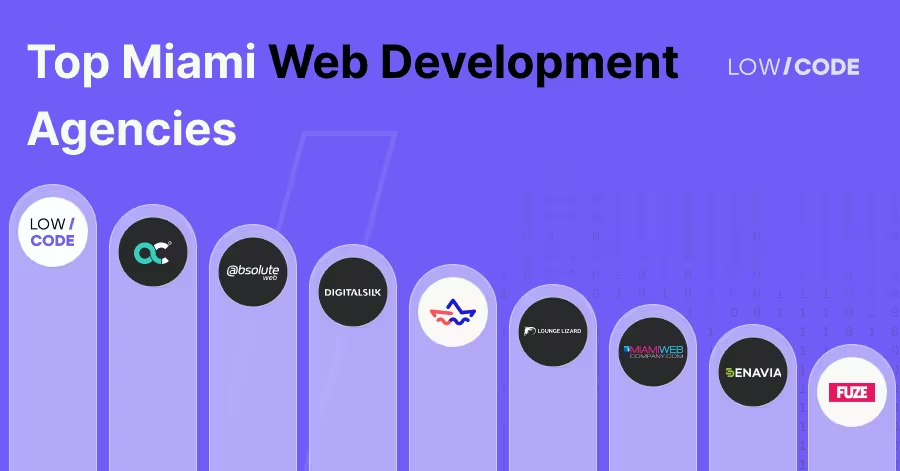
Best 9 Web Development Agencies in Miami (2026)
Find the best web development agency in Miami for your startup. Our 2026 list features fast, trusted teams that help you launch and grow fast
Webflow
Webflow Development for Your Non-Profit
How non-profits use Webflow to build high-impact sites on lean budgets — with donor pages, forms, and CMS built in.

Webflow
Best Business Website Development Companies
Find the best business website development companies in 2026. Compare top firms by expertise, pricing, and client results to pick the right partner.

Why customers trust us for no-code development


