

5 Real FlutterFlow App Examples (Live Product Use Cases)
16 min
read
Explore 5 real FlutterFlow app examples with live product use cases. See how teams build scalable mobile apps, MVPs, and production-ready solutions using FlutterFlow.


FlutterFlow is a visual app development platform that lets teams build real iOS and Android apps from a single codebase. Built on top of Flutter, it is used today to launch production-ready mobile apps with native performance, backend integrations, and full app store deployment.
That’s why real FlutterFlow app examples matter. Feature lists explain what a tool can do, but shipped apps show what actually works under real usage.
This guide focuses on live FlutterFlow apps built by startups and businesses, showing how teams use it to launch mobile MVPs, cross-platform products, and scalable apps without the overhead of traditional mobile development.
What Can You Build With FlutterFlow?
FlutterFlow is designed for teams that need production-ready mobile apps without sacrificing performance or flexibility.
Because it’s built on top of Flutter, it supports complex logic, real-time data, and native mobile experiences across platforms.
These are the most common app types built with FlutterFlow in real-world scenarios.
- Cross-platform mobile apps (iOS and Android)
These FlutterFlow apps are built from a single codebase and compiled for both iOS and Android. This approach reduces development and maintenance effort while delivering consistent performance, smooth animations, and native-like behavior across platforms. - Consumer-facing mobile applications
Designed for end users, these FlutterFlow apps typically include onboarding flows, profiles, notifications, and content-driven experiences. They focus on usability and performance while supporting authentication, API connections, and scalable backend logic. - Business and internal mobile tools
Internal tools replace spreadsheets and manual workflows with mobile-first systems. Common use cases include role-based access, forms, approvals, dashboards, and integrations that allow teams to operate efficiently from the field or on the move. - Booking and scheduling apps
These FlutterFlow apps manage availability, calendars, confirmations, and reminders. They’re commonly used for appointments, services, classes, and reservations that require real-time updates and user-specific scheduling rules. - Marketplace and service apps
Service-based marketplaces connect providers and users through mobile-first experiences. They typically include listings, matching logic, messaging, payments, and multi-role workflows to support transactional interactions. - SaaS companion mobile apps
Mobile companion apps extend existing SaaS platforms by focusing on core actions, alerts, and quick access. They allow users to interact with key features on the go without recreating the full web experience. - Community and social apps
Community-driven FlutterFlow apps include feeds, messaging, comments, and user-generated content. They rely on real-time updates, notifications, and engagement-focused interfaces to support ongoing interaction between users. - Healthcare and wellness apps
These FlutterFlow apps support habit tracking, wellness programs, patient portals, and health-related workflows. They emphasize secure access, structured data, and reliable mobile performance for daily, repeated use. - Education and training apps
Learning FlutterFlow apps deliver lessons, track progress, and support assessments or quizzes. They’re designed to structure content clearly while allowing teams to iterate quickly based on learner feedback and usage data. - Field service and operations apps
Used by teams working on-site or in remote locations, these apps support offline access, task tracking, inspections, and data syncing once connectivity is restored. - Event, membership, and loyalty apps
These FlutterFlow apps manage access to events, memberships, and loyalty programs. Common features include user accounts, gated content, QR codes, notifications, and reward tracking. - Startup MVPs and pilot products
MVPs and pilot apps are launched to validate ideas with real users. They focus on core functionality, fast iteration, and learning, while still being built on a foundation that can evolve into a full product.
Read more | Top FlutterFlow agencies
5 Real-World FlutterFlow App Examples
The following examples showcase real, production-ready FlutterFlow apps built and launched by LOW/CODE Agency.
These are not UI demos or experiments, but shipped products solving concrete business problems across wellness, community, operations, marketplaces, and consumer apps.
1. Evolutioner – Health & Wellness App
Evolutioner is a sound therapy and wellness mobile app used daily for meditation, sleep, and mental clarity. Reliability was critical, as users depended on the app during highly intentional moments of their wellness routines.

What problem the FlutterFlow app solved
The original app suffered from frequent crashes, unstable Android performance, and unreliable background audio. These issues disrupted users’ daily wellness routines, broke trust, and made the product unreliable for moments where consistency and calm were essential.
Why FlutterFlow was the right choice
FlutterFlow enabled a full rebuild with stable native performance across iOS and Android, reliable background audio playback, and flexible integrations for subscriptions. This allowed the app to behave like a professional audio product while remaining scalable and maintainable.
Outcomes or measurable impact
After rebuilding the app, crashes were reduced by 85%, background audio reliability reached 100%, and in-app purchases became fully stable, restoring user confidence and enabling long-term growth.
2. SuperQueer – Community and Social App
SuperQueer is a global LGBTQ+ community app connecting users with events, resources, and organizations across hundreds of cities worldwide, serving both individuals and large partner organizations.

What problem the FlutterFlow app solved
An early MVP built on Glide could not scale to support hundreds of partners and large datasets. Performance issues and data complexity made it difficult to maintain usability as adoption and content volume increased.
Why FlutterFlow was the right choice
FlutterFlow provided the scalability, backend flexibility, and design control required to support complex data structures, multiple user roles, and community-driven features without sacrificing performance.
Outcomes or measurable impact
The new FlutterFlow app launched with a 72% engagement rate and now supports over 440 global partners, enabling continued growth without platform limitations.
3. RedZone – Field Service and Operations App
RedZone is an internal operations app designed for sewer inspection teams working underground and in low-connectivity environments, where reliability and offline access are non-negotiable.

What problem the FlutterFlow app solved
Paper-based workflows and lack of connectivity caused data loss, inaccurate reporting, and inefficient work order processing, especially when workers regained signal long after inspections were completed.
Why FlutterFlow was the right choice
FlutterFlow enabled robust offline data storage, background synchronization, role-based access, and secure API integrations, ensuring the app worked reliably even without an internet connection.
Outcomes or measurable impact
The app reduced work order processing time by 40% and improved data accuracy by 80%, now serving approximately 150 users across field teams and city officials.
4. Juiced – Influencer Marketplace Platform
Posted App is a dual-sided influencer marketplace connecting brands with verified TikTok creators through a centralized, purpose-built platform.

What problem the FlutterFlow app solved
Influencer marketing workflows were fragmented across direct messages, spreadsheets, and manual outreach, leading to wasted time, missed opportunities, and inefficient campaign execution.
Why FlutterFlow was the right choice
FlutterFlow supported complex marketplace logic, dual user roles, verification flows, messaging systems, and scalable backend workflows within a single cross-platform mobile app.
Outcomes or measurable impact
The platform achieved a 60% increase in user sign-ups, 40% growth in brand partnerships, and generated over $500K in revenue within its first year.
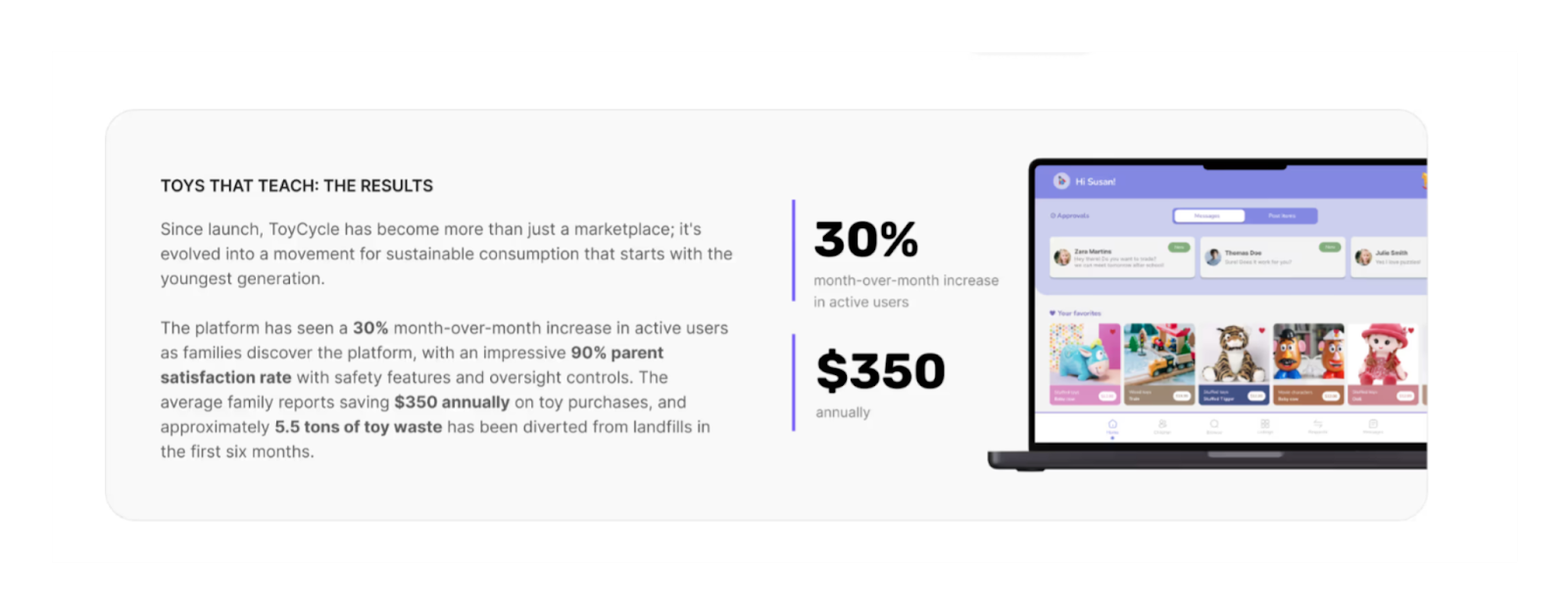
5. ToyCycle – Safe Marketplace for Kids
ToyCycle is a child-safe toy trading app designed to teach sustainability while maintaining strict parental oversight and compliance with privacy regulations for minors.
What problem the FlutterFlow app solved
The founders needed to balance children’s independence with parents’ need for safety, control, and trust, while supporting both toy trades and monetary transactions in a regulated environment.
Why FlutterFlow was the right choice
FlutterFlow allowed the implementation of complex account hierarchies, approval workflows, secure messaging, and marketplace logic within an intuitive, child-friendly mobile interface.
Outcomes or measurable impact
ToyCycle achieved a 30% month-over-month increase in active users and a 90% parent satisfaction rate, while fostering safe, community-driven interactions.
Features Commonly Used in These FlutterFlow App Examples
Across real production apps, FlutterFlow is consistently used to power mobile-first experiences that require performance, reliability, and flexibility.
These features appear repeatedly in shipped FlutterFlow apps because they support real operational needs, not just visual polish or prototyping speed.
- Native-like UI and animations
FlutterFlow apps deliver smooth transitions, responsive layouts, and fluid animations that feel indistinguishable from native builds. This is critical for consumer-facing and engagement-driven apps where performance and visual quality directly impact retention. - Authentication and role-based access
Most FlutterFlow apps rely on secure authentication combined with clearly defined user roles. This enables differentiated experiences for admins, operators, and end users while maintaining control over permissions, data access, and critical actions. - API integrations and backend connections
Real-world FlutterFlow apps frequently connect to external services through APIs. This allows them to integrate payments, analytics, messaging tools, and existing business systems without locking data inside the app itself. - Real-time data sync
Many FlutterFlow apps depend on up-to-date information across users and devices. Real-time syncing ensures changes are reflected instantly, supporting collaboration, live dashboards, and user interactions that rely on fresh data. - Forms, workflows, and logic handling
FlutterFlow apps often include complex forms, conditional flows, and validation logic. These workflows replace manual processes and ensure data is captured consistently while guiding users through structured actions. - Push notifications
Notifications are commonly used to drive engagement, confirm actions, and surface time-sensitive updates. They help apps stay relevant in users’ daily routines without requiring constant manual check-ins. - Offline and low-connectivity support
Some FlutterFlow apps are designed to function in environments with unreliable connectivity. Offline data storage and background syncing allow users to continue working and ensure no information is lost. - App store deployment support
Production-ready FlutterFlow apps require reliable publishing to iOS and Android app stores. FlutterFlow supports the full deployment process, enabling teams to ship, update, and maintain mobile apps without managing separate native codebases.
Read more | Top FlutterFlow experts
Tools and Integrations Used in FlutterFlow App Examples
FlutterFlow apps rarely operate in isolation. Most rely on a combination of backend services, third-party platforms, and automation tools to support real business workflows, payments, analytics, and scalable data handling.
These integrations allow FlutterFlow apps to evolve beyond standalone products and connect seamlessly with existing systems.
- Firebase and backend services
Firebase is commonly used for authentication, databases, and real-time data sync, while tools like Supabase or custom backends support more advanced data models, permissions, and scalability as apps grow. - REST APIs and third-party platforms
FlutterFlow apps frequently integrate with external platforms via REST APIs to connect CRMs, content systems, payment providers, and internal tools, ensuring data flows smoothly across the business ecosystem. - Payment gateways and subscriptions
Many FlutterFlow apps rely on Stripe, in-app purchases, or subscription platforms to manage payments and recurring billing. These integrations support secure transactions while enabling flexible monetization models. - Automation tools like Zapier and Make
Automation platforms are used to trigger workflows, sync data between tools, and reduce manual work. They allow teams to extend app functionality without adding complexity to the core product. - Analytics and user tracking tools
Tracking tools are integrated to monitor user behavior, feature usage, and engagement patterns. These insights help teams validate assumptions, prioritize improvements, and guide product decisions over time. - Messaging and notification services
Email services, push notification providers, and messaging APIs are used to keep users informed, support engagement, and deliver timely updates tied to in-app actions. - AI and data processing integrations
Some FlutterFlow apps integrate AI services for content generation, data enrichment, recommendations, or automated analysis, enabling smarter experiences without building custom AI infrastructure from scratch.
Read more | How to hire FlutterFlow developers
Business Impact of Real FlutterFlow Apps
Real FlutterFlow apps deliver value at the business level, not just in development speed.
Teams use these apps to launch faster, reduce risk, and adapt their products as real usage data comes in.
The impact is measured in time saved, costs reduced, and flexibility gained as products evolve.
- Faster mobile app development cycles
Teams move from idea to production in weeks instead of months. This shorter cycle allows businesses to validate assumptions quickly, respond to feedback early, and avoid long development phases before seeing real user behavior. - Lower cost compared to native development
Building a single app for multiple platforms reduces engineering overhead and maintenance costs. Businesses can allocate budget to product improvements and growth instead of managing separate native codebases. - Simultaneous iOS and Android launch
Apps are released on both platforms at the same time, ensuring consistent experiences and eliminating staggered rollouts. This helps teams capture demand across user segments without duplicating effort. - Easier iteration and feature updates
Product teams can adjust workflows, UI, and logic without full rebuilds. This makes it easier to refine features, fix issues, and respond to changing business needs without slowing momentum. - Scalable foundations for growing apps
Apps are built on architectures that support increasing users, data, and integrations. This allows products to evolve from MVPs into long-term operational tools without starting over.
Read more | Build Mental Health App With FlutterFlow
FlutterFlow vs Other Low-code Tools
Choosing the right low-code platform depends on what you’re building, how fast you need to move, and where the product is headed. FlutterFlow, Bubble, and Glide each excel in different scenarios.
The key is matching the tool to the product, not forcing the product into the tool.
Where FlutterFlow Works Best
- Mobile-first products
FlutterFlow is built for mobile from the ground up. It’s ideal when the primary experience lives on iOS and Android, rather than being adapted from a web-first product. - Cross-platform consumer apps
Teams can launch native apps for both iOS and Android from a single codebase, ensuring consistent UX, performance, and feature parity across platforms. - Apps needing native-like UX
For products where animations, transitions, and responsiveness directly affect retention, FlutterFlow delivers experiences that feel indistinguishable from native builds. - MVPs that may later scale
FlutterFlow supports fast validation while still providing a foundation that can grow in complexity, integrations, and user volume without requiring a full rebuild. - Teams prioritizing speed and flexibility
Product teams that need to ship quickly, test ideas, and iterate without managing separate native codebases benefit most from FlutterFlow’s development model.
Read more | FlutterFlow vs Glide
When FlutterFlow Is Not the Right Fit
- Web-only applications
If the product is primarily a web app with complex page-based navigation, Bubble is often a better fit due to its web-first architecture and backend flexibility. - Heavy backend-centric platforms
Products that require highly custom backend logic, complex server-side workflows, or deeply interconnected data models may be better served by Bubble or traditional development approaches. - Very simple internal tools
For lightweight internal apps built directly on spreadsheets or simple databases, Glide offers a faster and simpler path with less overhead.
In short, FlutterFlow excels when mobile experience, performance, and cross-platform delivery matter most. Bubble is stronger for complex web applications, while Glide is ideal for internal tools and rapid operational workflows.
Read more | FlutterFlow vs PowerApps
DIY vs Build With Experts
FlutterFlow makes mobile app development more accessible, but building a production-ready app still requires strong product, UX, and architectural decisions.
For founders and teams, the real question isn’t can you build it yourself, but whether DIY is the right path for the role the app will play in your business.
Cons of DIY FlutterFlow Apps
- Poor app architecture decisions
Early DIY builds often prioritize speed over structure. Navigation, state management, and feature logic can become tightly coupled, making future changes risky and expensive once real users and edge cases appear. - Backend and data modeling issues
Improper data structures, weak relationships, and unclear ownership rules lead to performance issues and unreliable behavior. These problems usually surface only after usage grows, when fixing them requires partial or full rebuilds. - Performance and scalability problems
Apps that work fine with a small user base may struggle under load. Inefficient queries, unoptimized workflows, and missing caching strategies can limit growth and degrade the user experience over time - App store approval challenges
Publishing to iOS and Android involves strict guidelines, edge cases, and review processes. DIY teams often face rejections due to configuration issues, permissions, or performance concerns they didn’t anticipate.
Why Build With LOW/CODE Agency
- Product-first mobile app thinking
Every FlutterFlow app is approached as a product. Workflows, user journeys, and data models are defined before development to ensure the app supports real business operations. - Experience shipping real FlutterFlow apps
With multiple production apps live across industries, the team brings hands-on experience navigating performance constraints, app store requirements, and real-world usage patterns. - Focus on UX, performance, and long-term growth
Apps are designed to scale, both technically and operationally. The focus is on clean architecture, reliable performance, and an experience users can trust as the product evolves.
If the app is central to your business, it’s worth building it with the same level of care as any long-term product, not as a quick experiment.
LOW/CODE Agency is the leading low-code product studio with expert FlutterFlow teams to design, build, and ship production-ready FlutterFlow apps that scale reliably.
Let’s talk about your project and define the right path forward.
Conclusion
FlutterFlow apps can support far more than quick prototypes. When built with the right structure, they power production-ready mobile products that scale across iOS and Android, handle real users, and support core business workflows. From consumer apps to internal tools and marketplaces, FlutterFlow has proven it can deliver reliable, native-like mobile experiences.
If these examples sparked ideas, the next step is turning inspiration into a clear execution plan. When a mobile app plays a real role in your business, building it properly from the start matters.
At LOW/CODE Agency, we help teams validate, design, and launch FlutterFlow apps that are built to last. If you’re ready to move forward, let’s discuss your product and the right way to build it.


Related Articles
Last updated on
September 3, 2026
.

Jesus is a visionary entrepreneur and tech expert. After nearly a decade working in web development, he founded LOW/CODE Agency to help businesses optimize their operations through custom software solutions.


FAQs
Can FlutterFlow be used to build production mobile apps?
Are FlutterFlow apps scalable for growing user bases?
Can FlutterFlow apps handle payments and APIs?
How complex can a FlutterFlow app be?
Can FlutterFlow apps be published to the App Store and Play Store?
What types of businesses use FlutterFlow apps the most?
Related Articles

FlutterFlow
How to Build a Table Reservation App with FlutterFlow
Learn how to create a table reservation app using FlutterFlow with step-by-step guidance and best practices for smooth development.

FlutterFlow
How to Build a Wallet App with FlutterFlow
Learn how to create a secure wallet app using FlutterFlow with this easy step-by-step guide for beginners and developers.

FlutterFlow
How to Build AI-Enabled Apps with FlutterFlow
Learn how to create AI-powered apps using FlutterFlow with step-by-step guidance and best practices for seamless integration.

FlutterFlow
11 Best FlutterFlow Alternatives in 2026 (Startups and Teams)
FlutterFlow too expensive or too limited? Compare the 11 best FlutterFlow alternatives in 2026 — with pricing, free plans, and the right fit for your project.


Why customers trust us for no-code development


